

How to Automate Business Operations for Growth (2026 Guide)

Heading 1
Heading 2
Heading 3
Heading 4
Heading 5
Heading 6
Lorem ipsum dolor sit amet, consectetur adipiscing elit, sed do eiusmod tempor incididunt ut labore et dolore magna aliqua. Ut enim ad minim veniam, quis nostrud exercitation ullamco laboris nisi ut aliquip ex ea commodo consequat. Duis aute irure dolor in reprehenderit in voluptate velit esse cillum dolore eu fugiat nulla pariatur.
Block quote
Ordered list
- Item 1
- Item 2
- Item 3
Unordered list
- Item A
- Item B
- Item C
Bold text
Emphasis
Superscript
Subscript

How to Automate Business Operations for Growth (2026 Guide)
.png)
Join us on November 6th as Mr. Yash Mishra, Product Manager, Fatakpay, reveals the precise strategies that eliminates the speed trap and guarantees a 30% conversion boost.
Businesses may hit a ceiling, a point beyond which they feel they cannot grow without hiring more. But that’s no longer the case. Today, companies can automate business operations to scale efficiently, drive profits, and grow without stretching their teams further.
Automation raises the ceiling by handling repetitive tasks, such as follow-ups, data entry, and more. It allows existing teams to focus on high-impact work that drives growth without burnout.
A 2024 Duke University study found that 60% of companies are already running automation in at least one process. These processes shift the business's momentum from reactive to proactive, which is required to drive growth.
It results in talent focusing on high-value tasks aligned with their expertise, rather than chasing leads or reconciling spreadsheets.
There’s a lot more that automation can unlock for modern businesses. Let’s find out.
What Does It Mean to Automate Business Operations?
Business automation is the use of technology to execute recurring, rules-based tasks and streamline workflows with minimal human intervention. By employing software and tools, organizations automate processes, such as invoicing, data entry, and marketing, to increase efficiency, reduce operational costs, minimize errors, and free up employees for higher-value work.
Types of Business Automation
- Task Automation: Focuses on simplifying single repetitive actions, such as sending emails, scheduling, or data entry.
- Robotic Process Automation (RPA): Software "bots" act like human workers, navigating software interfaces to perform tasks like invoice processing or data transfer between applications.
- Workflow Automation: Manages sequences of tasks and connects them into a smooth process, often including logic for approvals or notifications (e.g., employee onboarding).
- Intelligent Automation (IA) / AI-Powered: Combines RPA and BPM with artificial intelligence and machine learning to make decisions, handle unstructured data, and process complex scenarios.
- Business Process Management (BPM): Software solutions that organize, monitor, and improve end-to-end business operations across departments.
Key Areas Where Automation Drives Growth
Automation drives growth by enhancing operational efficiency, reducing costs, and improving accuracy across departments such as marketing, finance, HR, and supply chain management. Key areas:
- Marketing and Sales: Automation drives revenue through personalized email campaigns, lead scoring, and automated customer relationship management (CRM) systems.
- Customer Service: AI-powered chatbots and automated ticketing systems provide 24/7 support, enhancing customer satisfaction and retention.
- Finance and Accounting: Automated systems manage invoice processing, billing, and tax compliance, reducing errors and accelerating payment cycles.
- Supply Chain and Logistics: Automation optimizes inventory management, demand forecasting, and warehouse operations to reduce costs and speed up fulfillment.
- Human Resources: Streamlining payroll, onboarding, and benefits administration increases efficiency and improves the employee experience.
- Data Management and IT: Automated data collection, cleaning, and reporting provide real-time, actionable insights for faster, better decision-making.
These automations generally allow companies to reduce operating costs by up to 25–40% while liberating staff for strategic tasks, boosting overall productivity and competitiveness.
Benefits of Automating Business Operations
Automation provides significant benefits by increasing operational efficiency, reducing labor and operational costs, and improving accuracy by eliminating human error. It boosts productivity through faster, consistent, and 24/7 processing while enhancing employee experience by freeing them from monotonous tasks to focus on higher-value work. Key benefits of automation include:
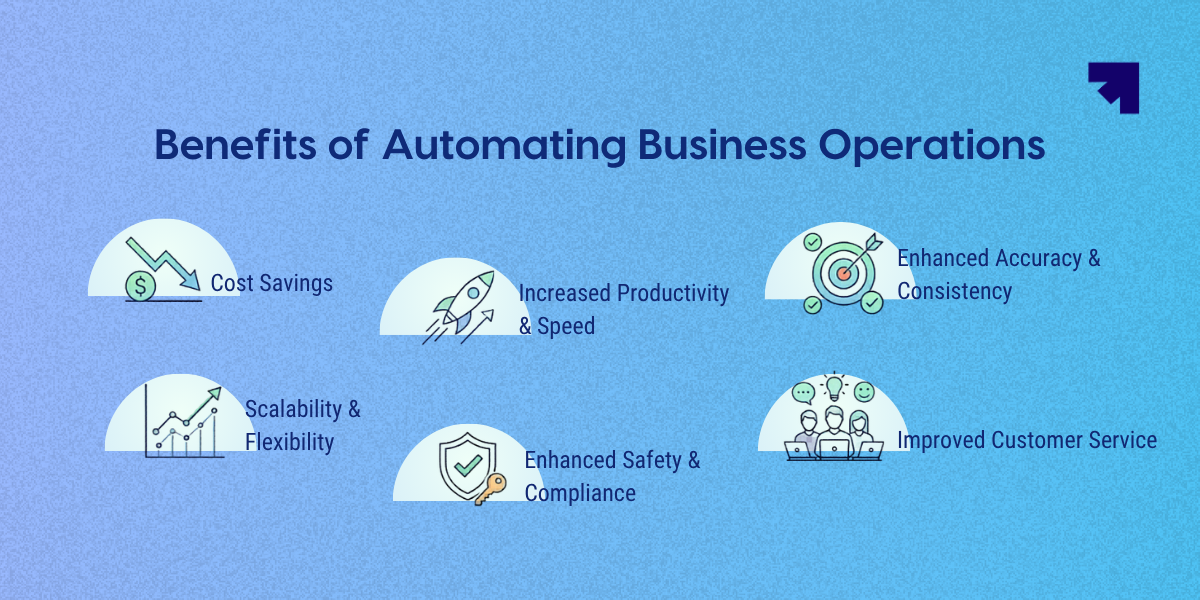
- Cost Savings: Automation reduces labor costs, cuts down on waste, and lowers energy expenses.
- Increased Productivity & Speed: Automated systems work faster and, unlike humans, can operate around the clock, accelerating turnaround times.
- Enhanced Accuracy & Consistency: Digital workers or robots perform tasks exactly the same way every time, decreasing errors and improving product quality.
- Improved Employee Experience: By delegating repetitive, boring tasks to machines, employees can focus on more creative and strategic tasks, boosting morale.
- Scalability & Flexibility: Automated workflows can quickly scale to handle increased workloads without requiring proportionally more staff.
- Enhanced Safety & Compliance: Automation minimizes risks to human workers by handling hazardous tasks and improves regulatory compliance by providing accurate audit trails.
- Improved Customer Service: Faster, reliable service leads to better experiences for customers.
How Automation Drives Modern Business Growth?
Automation applies across different business processes, replacing manual coordination with software-driven actions.
Let’s look at the role of automation in unlocking business growth.
Scaling Revenue Operations
RevOps follows a predetermined lead-scoring and assignment method as soon as it arrives. Even deal closures are aligned with how the customer is handed off to the success team.
Manual handoffs that introduce delays are replaced by automated handoffs triggered by an action completed the moment the previous one ends, without anyone having to initiate them.
Two quick impacts are:
Removing administrative tasks
Different teams are occupied in performing manual, repetitive tasks that are easy to automate. Research shows that sales representatives spend less than 28% of their week actually selling, potentially blocking the revenue.
A huge chunk of time goes into updating CRM records or manually sorting leads, freeing up time to close deals.
Credvent saw this at the lead management level by adopting Corefactors, which moved team members from manually entering leads from Google Forms and Excel sheets to directly importing website leads into CRM.
Driving personalization at scale
Automated CRM systems track how a prospect behaves and use that data to send the right message before the team member even picks up the phone. A team member working manually can personalize proposals and decks for 10 prospects, but with the automation behind them, they can do it for many more without directly impacting the quality.
HubSpot reports that 37% of reps now use AI tools, which they rate as the highest-ROI tool in their stack. The tool's ability to prioritize frees the team from guessing which leads to calls since the system uses historical data to flag accounts with the highest probability of closing.
Reducing Back-and-Forth to Enable Faster Decisions
Multi-step workflows such as credit approvals, invoice processing, and supply chain adjustments largely remained dependent on human availability. Every step needed someone to review before the next could begin. Automated logic removes that wait. Decisions that once took days now execute in seconds.
Quick wins here come through:
Scheduling automation that removes friction
Calendly reports that 43% of professionals spend at least 3 hours each week on the administrative back-and-forth of scheduling syncs and calls. The scheduling automation can remove those back-and-forths and allow external partners or internal teams to book confirmed times based on real-time availability.
The same friction exists inside shift-based operations. Building a weekly schedule means cross-referencing availability, tracking time-off requests, and fielding swap requests after the roster goes out.
Homebase automates employee scheduling for hourly teams, so that when a roster is built, staff are notified instantly via text and the app. Even shift reminders go out without the manager following up once. This frees the manager from chasing confirmations and allows them to get back to running the floor.
Follow-up automation
Gong's State of Sales Engagement report found that sales reps spend an average of 12 hours a week writing emails.
Most of it is consumed by outreach that follows a predictable pattern: introduction, follow-up, check-in, and re-engagement. Automating that pattern removes the representative from its repetitive parts.
It works by automating a tailored follow-up based on the specific stage of the deal, which moves the needle by:
- Pulling data from previous calls to insert specific details into follow-ups that help build trust without spending time on research for every single email.
- Removing drafting delays to shrink the time between a first meeting and a signed contract increases velocity.
Protecting and Expanding Customer Lifetime Value
Acquiring a new customer costs significantly more than keeping one, yet most businesses invest the bulk of their resources at the top of the funnel. McKinsey's research on the world's most successful growth companies found that 80% of their value creation comes from existing customers.
That’s why growth remains sustainable when a business retains the revenue it has already won by increasing customer lifetime value. Automation moves the needle here by enabling businesses to engage and grow their existing base through continuous monitoring.
Here’s how automation drives retention:
Predictive churn prevention through proactive engagement
By the time a customer cancels their engagement, the decision is already made. Predictive automation catches disengagement signals weeks earlier by tracking drops in product usage or unresolved customer support tickets that demand intervention before the customer reaches that point.
That intervention window is where modern businesses protect their revenue.
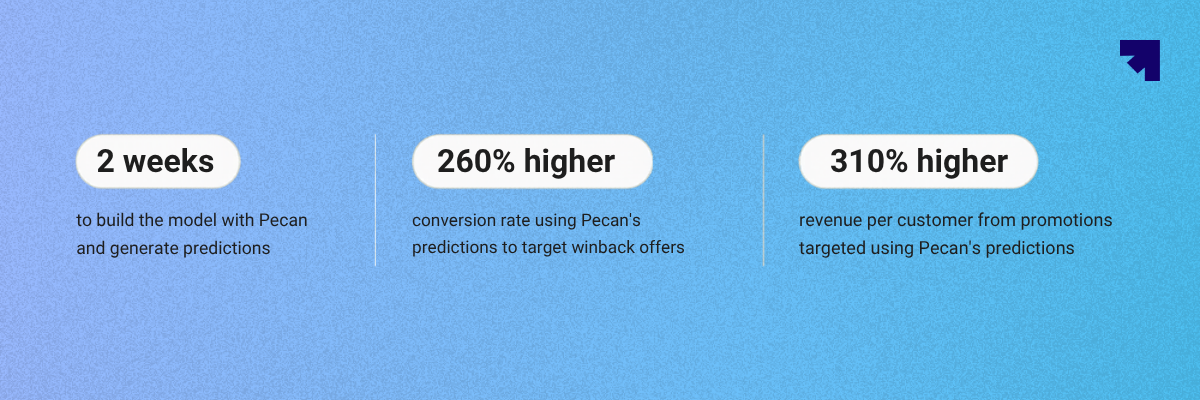
For instance, Hydrant used Pecan AI to predict exactly which customers would churn and which would return on their own, letting them target discounts only where it mattered. The result was 2.6x higher conversion and 3.1x more revenue per customer in winback campaigns.
Instant resolution
A customer who hits a support wall may quietly decide to leave. A Zendesk report suggests that 63% of customers are willing to switch to a competitor because of just one bad experience. Automation lets you handle high-volume, repeatable inquiries instantly, freeing human agents to work on more complex, revenue-sensitive cases.
Automation in customer resolution reduces wait times by providing immediate answers. Such quicker resolutions not only satisfy the customer but also clear the queue for human agents to handle more complex, revenue-sensitive issues.
For example, Klarna's AI assistant matched human agents in customer satisfaction scores while reducing resolution time from 11 minutes to under 2 minutes, resulting in a 25% drop in repeat inquiries. Fewer unresolved issues mean fewer reasons for a customer to reconsider their relationship with the business.
Unlocking Hidden Revenue Through Automated Intelligence
Most businesses only act on demand they can see. Automated intelligence identifies demand before a prospect fills out a form or calls.
It scans behavioral data to build a picture of who is already evaluating a purchase before they identify themselves by tracking signals such as which pages a prospect visited and how long they stayed. Then, that activity is to highlight accounts that are actively evaluating a purchase. In turn, the sales team gains insight into the prospect’s buying window, which helps them focus on evidence rather than assumptions.
The revenue growth through automated intelligence comes in two ways:
Improving win rates
Integrating AI-first workflows with a step-change improvement can unlock an over 30% increase in total win rates. It is possible when the automated intelligence highlights the accounts showing the strongest buying signals and feeds that context into the rep's workflow before the first call is made.
For example, during a live negotiation, an automated assistant can pull up a specific case study or pricing lever based on the exact objection the buyer just raised. A team member who already knows what a prospect has been researching walks into that conversation in a completely different position than one starting cold.
Recovering sawdust leads
Every business has a pile of leads occupying the CRM database while the team chases a new pipeline. Some of these include prospects that went quiet or details buried inside the inquiries. Even the contacts that never made it past the first touch. All this information remains seeded into their CRM and falls to the floor like sawdust.
Automation allows a business to deploy digital agents that engage these forgotten prospects at zero marginal cost. These agents filter for lead quality by starting low-pressure conversations and handing the lead back to a human only once a clear intent to buy is established.
Challenges and Risks of Business Automation
Business automation offers efficiency gains but presents significant risks, including high initial implementation costs, complex integration with legacy systems, and increased cybersecurity vulnerabilities. Key challenges include:
- Integration with Legacy Systems: Connecting modern automation tools with outdated, existing software can cause compatibility issues.
- High Initial Investment: Significant capital is often needed for software, hardware, and training.
- Employee Resistance and Skill Gaps: Staff may resist new technologies out of fear of job loss, and organizations may lack the internal skills to manage automated systems.
- Selecting the Wrong Processes: Attempting to automate complex or unstandardized processes often results in high maintenance and failed projects.
- Lack of Clear Goals: Many projects suffer from a lack of clear strategy and "scope creep," where the project expands beyond its original intent.
Key Risks of Business Automation
- Cybersecurity Threats: Automated systems can provide new attack vectors for, or leaks of, sensitive data.
- Over-Reliance on Technology: A decrease in human oversight can lead to the "paradox of automation" when systems fail, humans may be too detached to respond effectively.
- Operational Failures: Inaccurate data input or system errors can cause bottlenecks or ripple effects throughout the business.
- Lack of Flexibility: Automation works well with predefined rules but struggles with non-standard, unpredictable scenarios, resulting in high exception rates.
- Compliance and Data Privacy: Automated processes handling sensitive customer data 24/7 require rigorous logging and auditing to comply with regulations.
To mitigate these risks, organizations should focus on comprehensive planning, employee training, and establishing a balanced approach that combines automated efficiency with human judgment.
How to Implement Automation Successfully
- Identify and Assess Processes: Pinpoint bottlenecks, repetitive manual tasks, and inefficient workflows that, if fixed, offer high value (e.g., invoice processing, lead management).
- Set Clear Goals: Define Specific, Measurable, Achievable, Relevant, and Time-bound (SMART) objectives to measure success, such as reducing processing time by 30%.
- Choose the Right Tools: Select technology that aligns with your goals and integrates well with existing IT infrastructure.
- Pilot and Iterate: Start with small, manageable pilot projects (e.g., testing in one department) before scaling. Gather feedback, fix bugs, and refine workflows to ensure effectiveness.
- Manage Culture Shift & Training: Train employees to use new technologies and foster a culture that views automation as a supportive tool for work rather than a replacement.
- Establish Governance: Create a Center of Excellence (CoE) or dedicated team to manage, audit, and optimize automated processes long-term to ensure security and compliance.
Wrapping Up!
Modern businesses' growth is no longer confined to headcount. A lot comes down to how many processes a business automates and how significantly it does so. The scale with automation comes by removing the manual friction that prevents your existing team from reaching its full potential.
Automation is becoming a key differentiator for forward-looking businesses that are willing to invest in the right tools to get started. It’s an approach to ensure your business expands its ability to generate value and remains well ahead of its operating costs.
Heading 1
Heading 2
Heading 3
Heading 4
Heading 5
Heading 6
Lorem ipsum dolor sit amet, consectetur adipiscing elit, sed do eiusmod tempor incididunt ut labore et dolore magna aliqua. Ut enim ad minim veniam, quis nostrud exercitation ullamco laboris nisi ut aliquip ex ea commodo consequat. Duis aute irure dolor in reprehenderit in voluptate velit esse cillum dolore eu fugiat nulla pariatur.
Block quote
Ordered list
- Item 1
- Item 2
- Item 3
Unordered list
- Item A
- Item B
- Item C
Bold text
Emphasis
Superscript
Subscript
Frequently Asked Questions (FAQs)
What does it mean to automate business operations?


Automating business operations means using software to handle repetitive, rule-based tasks like data entry, follow-ups, scheduling, and reporting with minimal manual input.
How does automation support business growth?
Automation helps businesses handle more work without adding more people by reducing manual effort, speeding up processes, and allowing teams to focus on tasks that drive revenue and customer value.
Which business processes are best suited for automation?
Processes that are repetitive, time-consuming, and follow clear rules, such as email communication, lead management, invoicing, customer support, and reporting, are ideal candidates for automation.
Is automation only useful for large businesses?
No, small and mid-sized businesses benefit just as much. Automation helps them operate with limited resources and compete more efficiently without needing large teams.
What is the difference between automation and AI in business?
Automation follows predefined rules to complete tasks, while AI can analyze data, learn patterns, and make decisions. Many modern systems combine both to handle more complex workflows.








.png)


.png)