

Calculating CRM ROI: The Ultimate Playbook and Free Spreadsheet for Small Businesses

Heading 1
Heading 2
Heading 3
Heading 4
Heading 5
Heading 6
Lorem ipsum dolor sit amet, consectetur adipiscing elit, sed do eiusmod tempor incididunt ut labore et dolore magna aliqua. Ut enim ad minim veniam, quis nostrud exercitation ullamco laboris nisi ut aliquip ex ea commodo consequat. Duis aute irure dolor in reprehenderit in voluptate velit esse cillum dolore eu fugiat nulla pariatur.
Block quote
Ordered list
- Item 1
- Item 2
- Item 3
Unordered list
- Item A
- Item B
- Item C
Bold text
Emphasis
Superscript
Subscript

Calculating CRM ROI: The Ultimate Playbook and Free Spreadsheet for Small Businesses
.png)
Jesse
Join us on November 6th as Mr. Yash Mishra, Product Manager, Fatakpay, reveals the precise strategies that eliminates the speed trap and guarantees a 30% conversion boost.
When you're running a small business, every dollar counts. You need to know if your CRM is actually making you money or just storing your contact list. The right CRM can help you keep track of customer conversations, automate the boring stuff, and stop deals from disappearing into the void.
CRM ROI tells you exactly that: what you're getting back versus what you're spending.
This guide shows you how to calculate if you are getting your money’s worth from your current CRM is worth it, complete with a spreadsheet that does the heavy lifting for you.
Understanding the Importance of CRM for Small Businesses
A CRM is important for small businesses because it stops revenue from depending on memory.
When you have a small team, the same people are selling, handling support, sending invoices, and replying to messages. Without a system, leads get missed, follow-ups happen late, and customers slip through the cracks. A CRM gives you one place to track every relationship and one clear “next step” for every deal, so you can grow without things breaking.
It also makes your business less fragile. If one person is out sick or leaves, you don’t lose the customer history, the deal context, or the renewal timeline. You can hand work off without starting from scratch.
Avner Brodsky, CEO of GoodWishes, leads a company built around recognition: marking milestones, achievements, and moments that matter inside organizations. His perspective comes from watching how acknowledgment changes behavior long after the moment passes.
Brodsky says, “People don’t just want to do good work; they want to know it was seen. When achievements are made visible, whether it’s a certification on the wall or a note of recognition, it tells someone their effort mattered. That kind of signal sticks longer than incentives or announcements ever do.”
If your customer and sales activity currently lives in a mix of inboxes, spreadsheets, and people’s heads, a CRM is the simplest way to prevent missed revenue and make growth predictable.
What is ROI in the Context of CRM?
ROI is just a fancy way of asking, "Am I making more money than I'm spending on this thing?"
For CRM, you're looking at extra revenue and saved time, minus what you pay for the software and getting it running. The businesses that see the best returns are those that focus on metrics that matter to their specific goals. A B2B company might prioritize sales cycle length, while a service business might focus on customer retention rates.
So what actually affects your ROI? Three big aspects:
- Whether your team actually uses your CRM
- How well you train people (hint: more than you think)
- Making it work with your other tools
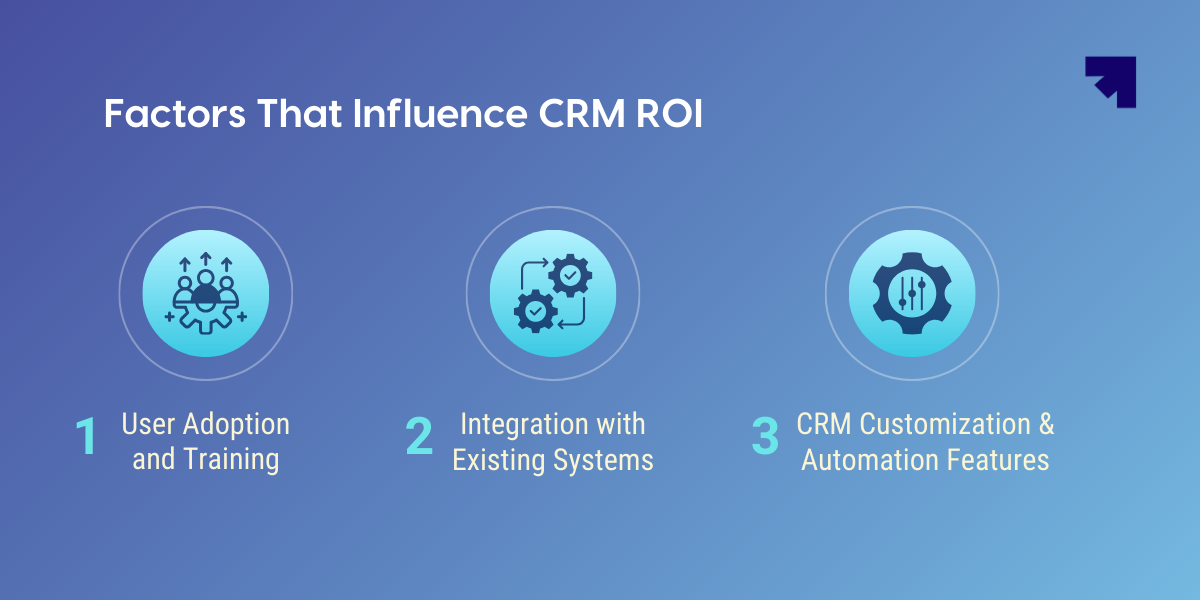
These determine whether the CRM becomes a daily system or just an expensive database. The fastest path to ROI is simple: pick a small workflow that matters, train it properly, and integrate the tools that feed it.
Cris McKee, Founder of GetWorksheets.com, builds tools for people who need structure that’s simple enough to stick with. He’s seen the same pattern in small teams over and over: the system that “should” work loses to the system people actually use.
McKee says, “Most small teams don’t fail because they picked the wrong software. They fail because the process never becomes a habit. If the CRM adds friction, people avoid it, and then your ROI math is built on half-truths. The best returns come from choosing one workflow that matters, training it properly, and making it easier than the old way.”
Steps to Calculate CRM ROI
You’re trying to answer one question: Is your CRM returning more value than it costs? Don’t make this a research project. Track a small set of numbers, total your costs, estimate benefits in plain dollars, then apply a simple formula.
At its core, CRM ROI is calculated as:
CRM ROI = [(Total Gains from CRM − Total Cost of CRM Investment) / Total Cost of CRM Investment] × 100
Everything below is about figuring out what belongs in total gains and total costs and doing it in a way that’s realistic.
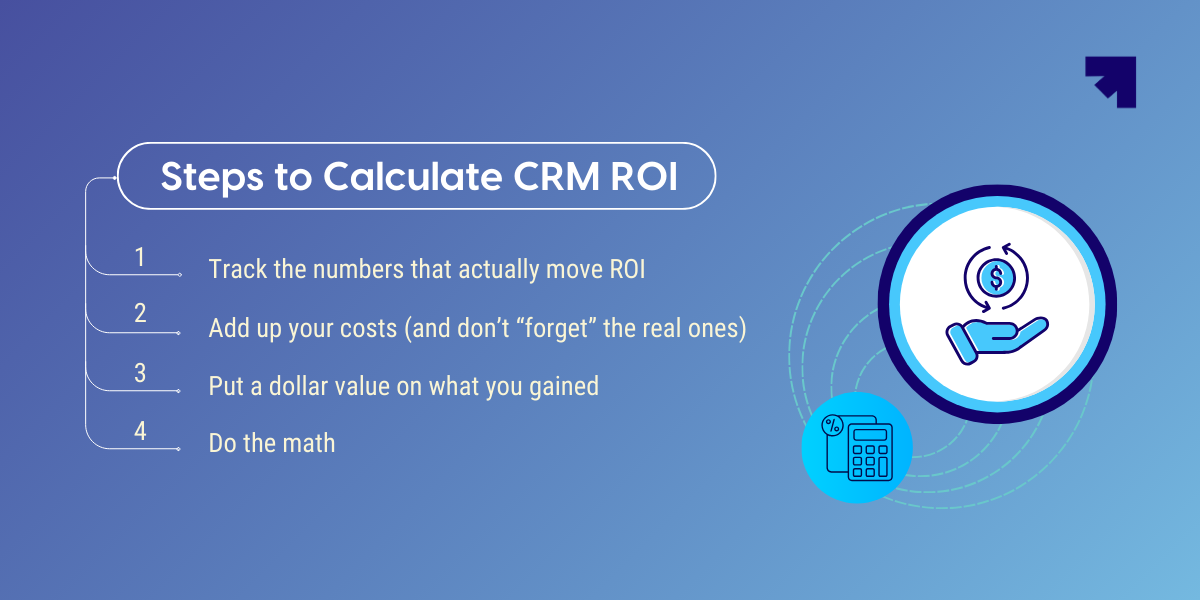
1) Track the numbers that actually move ROI
Start by picking six numbers you’ll track the same way every month.
Four of them come from sales performance: your lead-to-customer conversion rate, your win rate, your average deal size, and your sales cycle length. These tell you whether your CRM is helping you follow up more consistently, keep deals from going stale, and close faster.
Then add two operational numbers that usually show ROI first: hours saved per month (admin, logging, reporting, handoffs) and extra customers retained. These capture the “boring” wins that quietly pay for the CRM before revenue graphs even look different.
A simple example:
- If you typically close 18 customers from 200 leads in a month (9% conversion), and after tightening CRM workflows, you start closing 22, that’s not a vague improvement.
- That’s four more customers you can put a value on.
Same for time: if five people save two hours a week because tasks and reminders are automated, that’s roughly 40 hours a month you can translate into cost savings.
2) Add up your costs (and don’t “forget” the real ones)
CRM ROI falls apart when you only count subscription fees. Separate costs into two buckets: one-time setup costs and ongoing monthly costs.
One-time costs include setup/onboarding, data migration, customization, and training time. Ongoing costs include licenses/seats, add-ons, integrations, and paid support. Even if training was “internal,” it still cost you time from your best people, count it.
If you want this to be fast, you only need two totals:
- Total one-time cost
- Total monthly recurring cost
3) Put a dollar value on what you gained
Now convert your changes into monthly dollars. Keep it simple and slightly conservative.
You’ll usually have three benefit lines:
- Revenue gain: your average monthly revenue after CRM minus before CRM
- Time savings value: hours saved per month × hourly cost of the people saving that time
- Retention value (if relevant): extra customers retained × average revenue per customer
This is where most teams realize the CRM is paying off in places they weren’t measuring. A smoother handoff between sales and support can reduce errors and rework. Better pipeline hygiene can reduce the number of deals that die silently. Those are real savings, even if nobody labeled them “CRM ROI” at the time.
4) Do the math
Let’s say you run a small B2B SaaS agency.
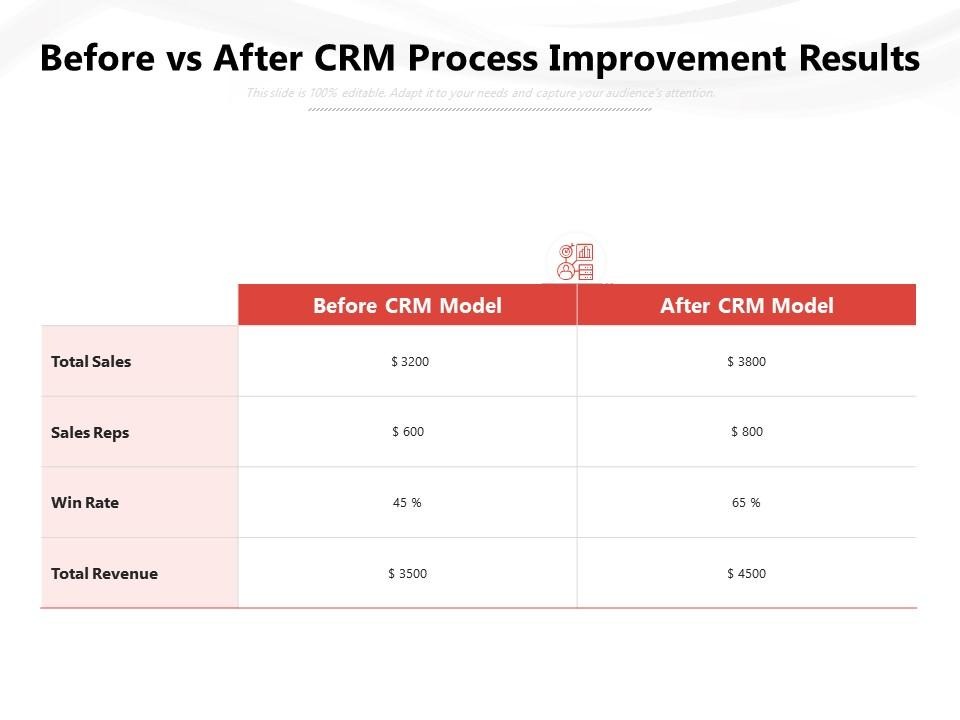
Before CRM, your average monthly revenue was $50,000. After you clean up follow-ups and stop losing leads, it’s $54,000. That’s a $4,000 revenue gain. Here’s an example of what before vs after CRM can look like.
Your team saves time, too. Three people save about 5 hours per month each because reminders, logging, and reporting aren’t manual anymore. That’s 15 hours/month saved. If their fully loaded cost is $30/hour, that’s $450/month in time savings.
Your monthly CRM cost is $600 (licenses + one add-on).
So:
- Total monthly benefit = $4,000 + $450 = $4,450
- Total monthly cost = $600
- ROI = [(4,450 − 600) / 600] × 100 = 641%
That number is high, so here’s the reality check: revenue is the squishiest part. If you only credit half of the revenue lift to the CRM (because other things changed too), your monthly benefit becomes:
- Adjusted benefit = $2,000 + $450 = $2,450
- ROI = [(2,450 − 600) / 600] × 100 = 308%
Still strong, and way more believable because you’re being conservative.
If you don’t want to do this math manually every month, use the spreadsheet template we made for you. You plug in your baseline revenue, current revenue, hours saved, and costs, and it calculates the monthly ROI and break-even automatically. It’s the same logic above, just faster and harder to mess up.
Joern Meissner, Founder and Chairman of Manhattan Review, has spent decades in a world where “I feel like I improved” doesn’t count unless it shows up on paper. His lens is measurement-first: set a baseline, track consistently, and don’t let a good story replace real proof.
Meissner says, “Most people don’t measure improvement they narrate it. They remember the good weeks and forget the messy ones. If you set a baseline and track the same few numbers every month, you stop guessing. And if you want the ROI number to be believable, you give the CRM less credit than you could. Conservative math is what makes the result defensible.”
Common Challenges in CRM ROI Calculation
You can do the math perfectly and still end up with a nonsensical ROI. Not because the formula is wrong, but because the inputs are lying to you. And most of the time, nobody’s lying on purpose. It’s just normal business chaos: half-filled fields, deals living in someone’s inbox, and revenue moving for reasons that have nothing to do with the CRM.
Here are the headaches that show up over and over, and how you handle them without turning this into a full-time job.
Data Quality Issues That Distort ROI
This sounds obvious, but the problem isn’t “bad data” in the abstract. It’s the same handful of patterns that make your ROI look great (or terrible) for the wrong reasons.
Common culprits:
- Deals sit in the wrong stage for weeks, so your sales cycle looks inflated.
- Deal amounts are blank or inconsistent, so revenue comparisons are fuzzy.
- Leads have no owner, so follow-ups don’t happen, and you can’t diagnose why.
- Lost deals don’t get marked as lost (or no reason), so the win rate looks better than reality.
What actually works:
- Make only the ROI-critical fields non-negotiable (owner, stage, amount, close date, and a simple lost reason).
- Add a short weekly cleanup habit: “anything untouched for 14 days gets updated or closed.”
- Do one quick sanity check before you trust your metrics: if your CRM shows almost no lost deals, you’re not elite, you’re under-reporting losses.
Attribution: Separating CRM Impact From Other Changes
This is where ROI write-ups start sounding like marketing. You implement a CRM, and revenue rises. Great. But also: you hired a better salesperson, changed your offer, ran a promo, fixed pricing, improved your website, or had a seasonal spike. So… was it the CRM?
Tom Bukevicius, Founder & Principal at SCUBE Marketing, works with businesses that want growth, but also want to understand what actually caused it. He’s seen teams obsess over tools and miss the basic question: did the process change, or did the story change?
Bukevicius says, “The fastest way to lose trust in an ROI number is to give the CRM credit for everything good that happened that quarter. Be conservative. Tie the benefit to a behavior you can point to, like faster follow-ups, fewer dropped leads, or deals moving stages on time. If you can’t connect the ‘lift’ to something the team actually started doing differently, it’s probably not a CRM win.”
If you give the CRM credit for everything, you’ll get a huge ROI number that no one believes.
A practical way to handle it:
- Be conservative with revenue credit. If multiple things changed, only attribute 25–50% of the revenue lift to the CRM.
- Tie CRM benefits to a behavior change. This is the easiest “human proof.” If lead response time dropped from 48 hours to same-day because routing/reminders finally worked, and conversion improved, that’s a cleaner story than “revenue went up.”
Sometimes the CRM doesn’t “increase revenue” directly. It just stops revenue from leaking. Fewer deals die silently. Fewer renewals get forgotten. Follow-ups don’t rely on memory. It’s like putting a lid on a leaky bucket. You don’t always feel it day to day, but the numbers eventually show it.
Overestimating Time Savings Without Proof
Time savings is the fastest way to show ROI, and also the easiest to overstate. Teams will tell you, “We’re saving hours every week,” but nothing changes: the pipeline doesn’t move faster, support tickets don’t clear quicker, output stays the same.
That usually means the time didn’t convert into anything measurable. It just got absorbed by the day (Slack, meetings, context switching, random fires).
How to keep it honest:
- Don’t estimate time saved from memory. Do a two-week before/after check.
- Only count time saved if it shows up somewhere:
- More follow-ups sent,
- More calls booked,
- Faster ticket resolution,
- Admin hours reduced,
- Backlog shrinking,
- Or avoiding a hire you would’ve needed.
- More follow-ups sent,
If you “saved 10 hours” but your week still feels equally packed, and nothing improved, you probably didn’t save 10 hours. You just moved stress around.
Hidden and One-Time Costs That Get Missed
This is a classic. Someone calculates ROI using only the monthly subscription. Then, finance looks at the implementation bill and goes, “Cool, where did this come from?”
Costs people forget:
- migration effort (even if it’s internal)
- setup help or consulting fees
- integration tooling
- training time (your best people’s time is expensive)
The fix is simple: report ROI in two layers.
- Monthly ROI (benefits vs recurring monthly costs)
- Break-even months (one-time costs divided by monthly net gain)
That way, nobody feels tricked, and your ROI story sounds like an adult wrote it.
How to Improve Your CRM ROI
Here’s how to improve your CRM ROI to fit into your day-to-day work. The biggest gains come from small changes that compound over time.
Start With One Workflow
Pick one workflow where things routinely fall apart, lead follow-ups, renewals, quote approvals, or support handoffs, and focus there.
When that workflow improves, ROI becomes visible fast. Response times drop. Fewer deals stall. Fewer customers get forgotten. Once one workflow is solid, move to the next.
Make Usage Unavoidable
CRM ROI improves when the system becomes the path of least resistance, not an extra step. If reps can close deals, send quotes, or move tickets forward without touching the CRM, they will, and your data will fall apart.
Practical fixes:
- Tie key actions (sending quotes, closing deals, marking tickets resolved) to CRM steps.
- Reduce optional fields and enforce only what matters.
- Automate logging wherever possible so people aren’t asked to “remember later.”
The goal isn’t perfect data. It’s data that’s good enough to trust.
Train for Habits
Most CRM training fails because it focuses on what the tool can do, not how your team should use it. ROI improves when training answers one question clearly: “What do I do differently now?”
Effective training looks like:
- Short, role-specific sessions (sales, support, ops)
- Clear examples of “good” vs “bad” CRM usage
- Reinforcement after a few weeks, not just once at launch
If people invent their own workflows, your CRM becomes five systems pretending to be one.
Integrate the Tools Your Team Already Uses
Every manual handoff reduces ROI. When your CRM doesn’t connect cleanly to email, calendars, forms, billing, or support tools, people work around it, and context gets lost.
You don’t need dozens of integrations. You need the right few:
- Email and calendar (for activity tracking)
- Lead sources (forms, ads, chat)
- Quotes/invoicing or support tickets, if relevant
Each clean integration removes friction and improves adoption, which directly improves ROI.
Review ROI Regularly
CRM ROI isn’t a one-time calculation. It changes as your team grows, processes mature, and costs shift. The teams that see sustained returns treat ROI like a monthly check-in, not a launch-day report.
A simple cadence works:
- Review ROI monthly
- Revisit assumptions quarterly
- Recalculate after major process changes or hires
This keeps you honest and helps you spot whether improvements are actually sticking.
The Role of a Spreadsheet in Simplifying CRM ROI Calculations
A good spreadsheet beats napkin math every time. We built one that handles the heavy lifting.
Here's what's in it:
- Places to enter your sales, customer, and efficiency numbers
- Cost tracking that separates one-time from recurring expenses
- Automatic calculations for revenue gains and cost savings
- A dashboard that shows monthly and quarterly trends
- What-if scenarios so you can play with the numbers
How to use it like a pro:
1. Start by recording 2-3 months of data before you implement CRM
2. List all your costs, noting what's one-time versus monthly
3. Track results for at least one full sales cycle
4. Check the dashboard monthly, not just once
5. Update after you make process improvements to see the impact
You can grab the free spreadsheet below. Just fill in the values in the cells, and you’re good to go.
Once you’ve filled in the spreadsheet, one thing becomes obvious fast: the math is only as good as the inputs.
If your leads live in inboxes, follow-ups depend on memory, or deal stages aren’t updated consistently, your ROI number will wobble. This is usually the point where teams realize the problem is creating clean, repeatable data in the first place.
That’s where a CRM like Corefactors earns its keep. Instead of treating CRM as a reporting tool, Corefactors focuses on structuring the workflows that drive the numbers you just entered, lead assignment, follow-ups, deal movement, renewals, and customer history. When those actions happen inside one system, your spreadsheet stops relying on estimates and starts reflectin`g reality.
The practical way to approach this is simple: take the workflow that caused the biggest gap in your spreadsheet, such as missed follow-ups, long sales cycles, or inconsistent deal tracking, and ask whether your current setup actually supports it. If it doesn’t, that’s the signal to evaluate a CRM that fits your process instead of forcing you into a new one.
Heading 1
Heading 2
Heading 3
Heading 4
Heading 5
Heading 6
Lorem ipsum dolor sit amet, consectetur adipiscing elit, sed do eiusmod tempor incididunt ut labore et dolore magna aliqua. Ut enim ad minim veniam, quis nostrud exercitation ullamco laboris nisi ut aliquip ex ea commodo consequat. Duis aute irure dolor in reprehenderit in voluptate velit esse cillum dolore eu fugiat nulla pariatur.
Block quote
Ordered list
- Item 1
- Item 2
- Item 3
Unordered list
- Item A
- Item B
- Item C
Bold text
Emphasis
Superscript
Subscript
Frequently Asked Questions (FAQs)
How long does it take to see ROI from a CRM?


Most small businesses start seeing early ROI within 1–3 months, usually through time savings and better follow-ups rather than immediate revenue growth. Clear revenue impact often shows up after one full sales cycle, once deals have had time to move from lead to close inside the CRM.
What if my revenue changes for reasons other than the CRM?
That’s normal, and it’s why conservative attribution matters. If multiple changes happen at once, such as new hires, pricing updates, or seasonality, only attribute part of the revenue lift to the CRM. Many teams credit 25–50% of the increase to stay realistic and defensible.
Can a CRM have positive ROI even without revenue growth?
Yes. Many CRMs pay for themselves through time savings, fewer errors, and better retention before revenue numbers move. Avoided hires, faster handoffs, and reduced admin work are real financial gains, even if they don’t show up as new sales immediately.
What’s the most common reason CRM ROI looks bad?
Low adoption. If the team doesn’t use the CRM consistently, the data becomes unreliable, and the benefits disappear. ROI problems are usually process and usage problems, not software problems.
How often should I recalculate CRM ROI?
At a minimum, review ROI monthly and reassess assumptions quarterly. Recalculate whenever something major changes, such as new workflows, team size, pricing, or integrations, so your numbers reflect reality, not last quarter’s setup.

%20(5).png)





.png)


.png)