

Why Most CRM Data Becomes Useless Within 90 Days, And How to Prevent It

Heading 1
Heading 2
Heading 3
Heading 4
Heading 5
Heading 6
Lorem ipsum dolor sit amet, consectetur adipiscing elit, sed do eiusmod tempor incididunt ut labore et dolore magna aliqua. Ut enim ad minim veniam, quis nostrud exercitation ullamco laboris nisi ut aliquip ex ea commodo consequat. Duis aute irure dolor in reprehenderit in voluptate velit esse cillum dolore eu fugiat nulla pariatur.
Block quote
Ordered list
- Item 1
- Item 2
- Item 3
Unordered list
- Item A
- Item B
- Item C
Bold text
Emphasis
Superscript
Subscript

Why Most CRM Data Becomes Useless Within 90 Days, And How to Prevent It
.png)
Join us on November 6th as Mr. Yash Mishra, Product Manager, Fatakpay, reveals the precise strategies that eliminates the speed trap and guarantees a 30% conversion boost.
Hand your best closer a lead generated just three months ago and watch exactly what happens next. They completely ignore the phone number. They bypass the job title entirely. They immediately open a new tab and run a forensic background check on LinkedIn just to verify the prospect still breathes the same corporate air. Your CRM currently forces your most expensive closers to moonlight as amateur private investigators.
B2B data rots at an astonishing rate. Analysts suggest a 30% annual decay. The reality on the sales floor is significantly bleaker. When it comes to active pipeline management and buying intent, most CRM data becomes functionally useless often within 90 days.
Operating on this expired data guarantees massive outreach bounce rates. It completely destroys your forecasting accuracy. Revenue operations teams frequently try patching the leak by purchasing highly expensive third-party enrichment tools. Pouring fresh data into a structurally broken database is a massive waste of your budget.
Fixing the root cause requires a data freshness operating system built entirely on strict governance and automated lifecycle checkpoints.
What is CRM Data Decay?
CRM data decay (often referred to as data rot or data degradation) is the inevitable, gradual loss of accuracy and relevance of the information stored inside your customer database.
In the B2B world, reality moves much faster than your static records. Decision-makers get promoted, champions leave for competing firms, companies get acquired, email domains migrate, and budgets freeze.
Data decay is simply the widening gap between the reality of the market and the snapshot frozen in your CRM. When a lead is initially captured, it is 100% accurate. Every day that passes without verification, its reliability drops, eventually crossing the 90-day threshold where it becomes more of a liability than an asset.
The Root Causes of the 90-Day CRM Data Decay
CRM data does not rot by accident. It decays through predictable, systemic process failures. Before implementing a complex technical solution or buying another data enrichment tool, RevOps leaders need to look at exactly why their records are degrading so rapidly. Almost every instance of CRM data decay traces back to one of these three structural flaws:
1. Unclear Ownership Across the Revenue Funnel
When everyone is responsible for CRM data hygiene, no one is actually accountable for it. Think about the standard lifecycle of a B2B lead: it is generated by marketing, qualified by a Sales Development Rep (SDR), handed off to an Account Executive (AE), and eventually managed by Customer Success.
During these transitions, responsibility falls into a gray area. If an AE learns on a discovery call that the prospect recently changed job titles, who updates the contact record? If the AE assumes the SDR already did it, the record instantly becomes outdated. Without strict, documented rules governing who owns specific fields at each stage of the buyer's journey, critical context is lost during the handoff.
2. Toxic Field Proliferation
Over time, well-meaning managers request new custom fields to track hyper-specific initiatives. The VP of Sales wants a "Primary Competitor" dropdown. Marketing wants a "Favorite Webinar" checkbox. Before long, a simple contact layout balloons into 65 different fields.
When a sales rep opens a record to log a simple email and is confronted with a wall of mandatory properties, many of which are completely irrelevant to their current task, they will take the path of least resistance. They will type "N/A", hit the spacebar, or select the very first option in a dropdown menu just to bypass the system's validation rules. A bloated CRM architecture actively trains your sales team to input garbage data.
3. Relying on Human Memory Instead of Workflow Design
Perhaps the most common cause of CRM data decay is the reliance on human discipline. Picture a top-performing sales rep navigating back-to-back Zoom calls from 9 AM to 2 PM. By the time they finally open their CRM at 3 PM to update their pipeline, the nuanced details, exact phrasing, and specific buying timelines from that first morning call are completely gone.
Expecting busy salespeople to act as flawless data-entry clerks is a complete operational fantasy. When data updates rely entirely on human memory rather than mandatory, automated process design, the CRM quickly stops reflecting reality and instead reflects whatever the rep can vaguely remember at the end of the day.
The Business Impact of Stale CRM Data
Ignoring data decay isn't just an administrative headache; it has severe, quantifiable impacts on your bottom line. When your CRM is filled with expired information, the damage spreads across the entire revenue engine:
- Higher email bounce rates: Sending campaigns to obsolete email addresses damages your domain reputation, eventually causing even your legitimate emails to land in spam folders.
- Misleading pipeline forecasts: If deals are tied to champions who have left the company or budgets that no longer exist, your projected revenue is pure fiction.
- Poor lead routing: Stale firmographic data means high-value enterprise leads might get routed to junior SMB reps, killing the deal before the first call.
- Lower rep productivity: Sales reps spend hours cross-referencing LinkedIn and ZoomInfo instead of actually selling, completely destroying their daily output.
- Wasted enrichment spend: Buying third-party data to overlay onto a fundamentally broken, duplicate-heavy CRM is like pouring clean water into a leaky bucket.
How to Fix CRM Data Decay: A 4-Phase System
Fixing CRM data decay is not about one tool or one cleanup exercise. It requires a structured approach across how data is captured, enriched, validated, and maintained over time. The most effective RevOps teams treat this as a system, not a task.
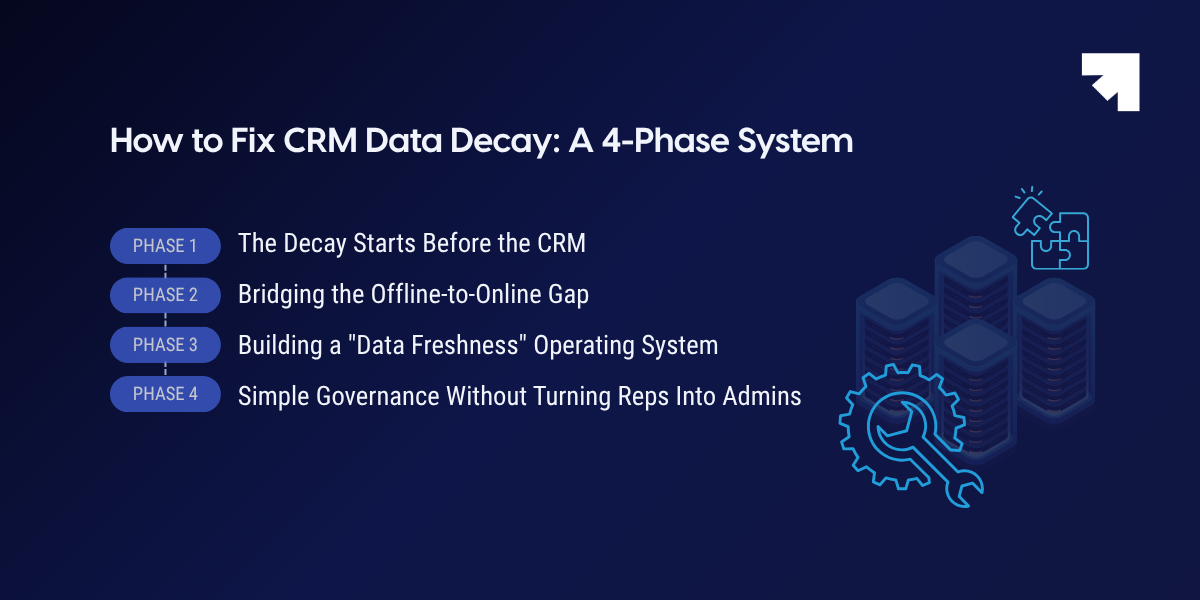
Here is how that system works in four phases:
Phase 1: The Decay Starts Before the CRM
A common trap in RevOps is assuming that data decay only happens after a record is created. In reality, the foundation for useless CRM data is often laid before a prospect even enters your system. It starts with fundamental flaws in how digital behavior and attribution are initially captured.
Modern B2B marketing relies heavily on tracking a user's digital footprint (what pages they visited, where they came from, and what intent signals they showed before finally booking a demo). However, the architecture of the modern web has significantly complicated this baseline data collection.
Today, most interactive SaaS and B2B websites rely heavily on JavaScript frameworks to deliver personalized, lightning-fast user experiences. But if these JavaScript-heavy pages are not properly rendered for analytics tools, enrichment bots, and search engine crawlers, critical behavioral signals are permanently lost in the background.
If your technical marketing team does not fundamentally understand the differences in how dynamic vs static websites handle rendering, your CRM will inevitably suffer. Analytics scripts might fire before the page fully loads, stripping away vital UTM parameters. Lead routing tools might fail to capture the original referring URL.
The result? Your CRM gets flooded with leads labeled "Source: Direct" or "Source: Unknown."
When attribution data is missing or broken at the exact point of capture, the resulting CRM record is incomplete from day one. Ensuring that your technical infrastructure properly renders content for accurate tracking is the crucial first step in maintaining data integrity. You cannot maintain the freshness of a record that was already corrupted the moment it was created.
Phase 2: Bridging the Offline-to-Online Gap
Data decay is not exclusively a digital problem. In fact, it is often severely accelerated when organizations attempt to bridge the gap between physical, real-world interactions and digital CRM records.
Ask any RevOps professional about their biggest data hygiene nightmares, and they will likely point to the post-event spreadsheet upload. Field sales teams and event marketers frequently rely on collecting business cards, jotting down handwritten notes, or managing bulk badge scans after a major trade show or industry conference.
This introduces a massive, artificial time delay into your data ecosystem. By the time this offline data is manually keyed or imported into the CRM days (or sometimes weeks) later, the prospect's immediate buying intent has completely cooled. Furthermore, human error during the transcription process inevitably corrupts the entry. Names are misspelled, nuanced context from the conversation is entirely forgotten, and critical follow-up tasks slip through the cracks.
If an Account Executive speaks to a highly qualified prospect on a Tuesday, but the event lead list isn't uploaded until the following Monday, the data is already stale the second it hits the system.
To eliminate this manual entry decay, high-performing organizations are modernizing their offline data capture to happen in real-time. By deploying strategic, trackable QR codes created via secure and reliable dynamic QR code generators on event booths, physical direct mailers, or presentation decks, companies can pipe prospect engagement data directly into their CRM without delay.
When a prospect scans a code to download a technical whitepaper or view a pricing sheet, their contact information and specific asset interest are instantly logged. This seamless connection triggers an immediate, automated follow-up sequence while the prospect is still walking the trade show floor. Removing the human data-entry bottleneck from offline events ensures the new record is perfectly accurate, context-rich, and immediately actionable.
Phase 3: Building a "Data Freshness" Operating System
Once you have secured the integrity of your incoming data (both online and offline), you have to build an internal operating system to protect it. This requires shifting your CRM from a passive storage drive into an active, rule-based environment.
Implement Strict Rule-Based Validation
Free-text fields are the absolute enemy of clean data. If you allow sales reps to manually type in a prospect's industry, you will inevitably end up with "SaaS," "Software," "Tech," and "Information Technology" all describing the exact same account. You cannot build reliable account-based marketing (ABM) campaigns or run accurate RevOps platform reports on wildly inconsistent data.
To maintain baseline usability, RevOps must lock down the system:
- Enforce Dropdowns: Replace open text boxes with standardized, globally accepted dropdown menus for critical demographic and firmographic data.
- Use Dependent Fields: Ensure that selecting a specific "Closed Lost" reason automatically triggers a mandatory secondary field requesting deeper context. Do not leave it to the rep's discretion to hopefully add helpful notes later.
- Format Standardization: Use automated formatting rules to standardize phone numbers, state abbreviations, and country codes so the data can actually be queried and routed correctly by your marketing automation tools.
Establish Lifecycle Checkpoints
Instead of asking reps to constantly update every single field, RevOps should implement lifecycle checkpoints. These are specific, non-negotiable moments in the sales process where a deal simply cannot progress until certain data points are verified as fresh.
For example, a deal cannot physically be dragged from the "Discovery" column to the "Proposal" column unless the "Decision Maker," "Budget Status," and "Implementation Timeline" fields have been updated within the last 72 hours. By tying data validation directly to deal progression, you naturally align data hygiene with the sales rep's primary incentive: closing the deal and getting paid.
Phase 4: Simple Governance Without Turning Reps Into Admins
The ultimate goal of a data freshness operating system is to maintain absolute accuracy without turning your highly-paid sales executives into full-time data administrators. If your governance process requires a rep to spend an hour a day manually cleaning up their accounts, adoption will instantly drop to zero.
To make data hygiene sustainable, RevOps must draw a hard line between what a human should do and what software should do.
Deploy Automated Enrichment for Static Data
Sales reps should only be responsible for inputting contextual data that cannot be scraped from the internet. They should be logging the specific pain points mentioned on a discovery call, the political dynamics of a buying committee, or a champion's personal communication preferences.
They should never spend their valuable selling time manually entering a company's annual revenue, employee headcount, or headquarters address. RevOps must integrate automated, third-party data enrichment tools that constantly refresh these static firmographic data points in the background. If a target account raises a Series B or changes its official industry classification on LinkedIn, your CRM should automatically update that field without a human ever touching it.
Appoint Departmental Data Stewards
Governance requires oversight, but relying on a single, overwhelmed CRM administrator to police an entire database is a recipe for failure. Instead, organizations should appoint departmental data stewards.
A designated SDR manager, an AE leader, and a Marketing Ops specialist should meet monthly to review cross-functional data health dashboards. These dashboards should be simple, specifically highlighting "rotting" records—contacts that have active open opportunities but have not been engaged or updated in 90 days.
When managers hold their own teams accountable for these decaying records during weekly 1:1s, data hygiene transforms from an isolated IT problem into a shared revenue priority.
How to Measure CRM Data Freshness
You cannot fix what you cannot measure. To establish a baseline for your data health and prove the ROI of your new governance systems, RevOps teams must track specific freshness metrics:
- Time Since Last Touch: Calculate the average number of days since a contact or account was last engaged via email, call, or meeting. Anything creeping toward the 90-day mark requires immediate attention.
- Blank Field Percentage: Audit your mandatory fields (like Job Title, Industry, or Revenue) to see what percentage of your database is missing core routing data.
- Bounce Rate Trends: Monitor your email hard bounce rates month-over-month. A sudden spike is often the first indicator of systemic CRM data decay.
- Record Age vs. Win Rate: Analyze if deals created from contacts older than 90 days have a statistically lower win rate than fresh leads to validate the necessity of data purging.
Conclusion
The 90-day expiration date on B2B data is a permanent reality. Trying to outrun it with frantic quarterly cleanups will always fail. You have to build a system that actively fights the decay on a daily basis. When your revenue teams finally trust the screen in front of them, they stop acting like amateur private investigators. They drop the forensic LinkedIn searches, stop second-guessing their pipeline, and start executing their outreach with absolute, ruthless precision.
Heading 1
Heading 2
Heading 3
Heading 4
Heading 5
Heading 6
Lorem ipsum dolor sit amet, consectetur adipiscing elit, sed do eiusmod tempor incididunt ut labore et dolore magna aliqua. Ut enim ad minim veniam, quis nostrud exercitation ullamco laboris nisi ut aliquip ex ea commodo consequat. Duis aute irure dolor in reprehenderit in voluptate velit esse cillum dolore eu fugiat nulla pariatur.
Block quote
Ordered list
- Item 1
- Item 2
- Item 3
Unordered list
- Item A
- Item B
- Item C
Bold text
Emphasis
Superscript
Subscript
Frequently Asked Questions (FAQs)
What is the standard rate of B2B CRM data decay?


Industry analysts estimate that B2B data decays at a rate of roughly 30% per year. However, in high-turnover industries like tech or SaaS, this rate can be significantly higher, often rendering data functionally obsolete within 90 days.
Who should be responsible for CRM data hygiene?
While sales reps must input contextual deal data, RevOps should own the structural hygiene. Implementing automated enrichment and establishing departmental "data stewards" prevents the burden from falling entirely on the sales team.
How do third-party enrichment tools help?
Enrichment tools automatically update static firmographic data (like company revenue, headcount, or headquarters locations) in the background. This keeps baseline account data fresh without requiring manual data entry from reps.
Why is free-text entry bad for a CRM?
Free-text fields lead to inconsistent data (e.g., entering "SaaS" vs. "Software" vs. "Tech"). This inconsistency breaks automated lead routing, ruins reporting accuracy, and makes targeted account-based marketing nearly impossible.
How often should we audit our CRM data?
Instead of relying on massive annual cleanups, organizations should implement automated, continuous monitoring. Departmental managers should review "rotting" records (contacts inactive for 90+ days) on a monthly basis.






.png)


.png)