

What is Mobile CRM? A 2026 Guide

Heading 1
Heading 2
Heading 3
Heading 4
Heading 5
Heading 6
Lorem ipsum dolor sit amet, consectetur adipiscing elit, sed do eiusmod tempor incididunt ut labore et dolore magna aliqua. Ut enim ad minim veniam, quis nostrud exercitation ullamco laboris nisi ut aliquip ex ea commodo consequat. Duis aute irure dolor in reprehenderit in voluptate velit esse cillum dolore eu fugiat nulla pariatur.
Block quote
Ordered list
- Item 1
- Item 2
- Item 3
Unordered list
- Item A
- Item B
- Item C
Bold text
Emphasis
Superscript
Subscript

What is Mobile CRM? A 2026 Guide
.png)
Karthik A
Join us on November 6th as Mr. Yash Mishra, Product Manager, Fatakpay, reveals the precise strategies that eliminates the speed trap and guarantees a 30% conversion boost.
Mobile CRM or mobile customer relationship management brings your CRM to smartphones, tablets, and other internet connected devices so teams can manage customer relationships wherever work happens.
Revenue does not wait for office hours. Sales meetings take place at client locations. Service issues are handled on site. Approvals move between travel schedules. So why should your CRM stay tied to a desk? When updates are delayed, details shrink. Follow ups slip. Pipelines reflect fragments instead of facts.
Mobile CRM changes that flow. Teams update opportunities the moment a meeting ends. Calls are logged instantly. Tasks are assigned on the spot. Data syncs automatically across the system. Managers see live pipeline movement. Forecasts reflect current activity. Customers receive faster, more informed responses because context is always available.
Research shows that 61% of organizations consider it a mainstream tool, while roughly 48% of users access CRM through smartphones. In this blog, we will break down what mobile CRM is, popular examples in the market, the core benefits, essential features, practical use cases, how to choose the right solution, and why Corefactors CRM is built for growing revenue teams like you.
What is mobile CRM?
Mobile CRM or mobile customer relationship management enables teams to access, update, and manage customer data directly from smartphones and tablets while they are away from their desks. It extends the core CRM system to mobile devices so work does not pause when someone leaves the office.
Sales, marketing, and service teams can view contacts, check deal stages, log calls, add notes, and schedule follow ups in real time. Every update syncs with the central database. That means the information stays consistent across devices. Managers see changes instantly. Teams stay aligned without extra emails or calls.
For example, a field sales executive who has just stepped out of a client meeting. The prospect agrees to move forward but requests revised pricing and a clear timeline. The executive opens the mobile CRM app, updates the opportunity stage, records discussion notes, adjusts the expected revenue, and assigns the next action to the pre-sales team, all before reaching the parking lot.
By the time the executive reaches the next appointment, the internal team already has full context. This real time execution creates measurable value for employees, businesses, and customers.
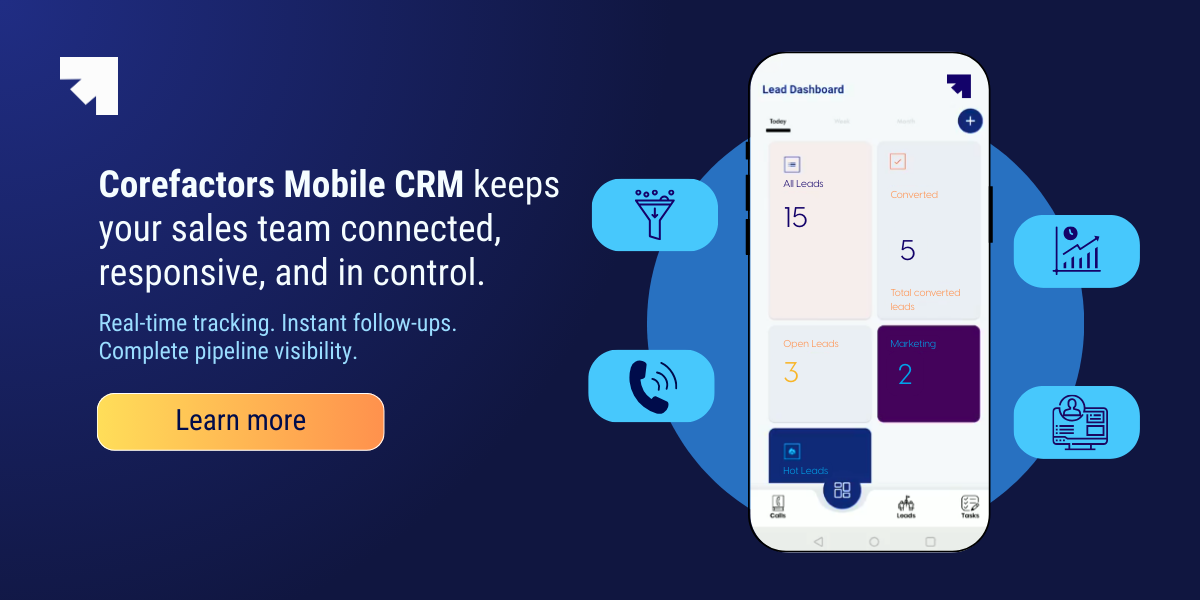
For employees
- Field teams log visits, update deals, and schedule follow ups on the spot
- Offline access keeps work moving in low network areas
- Reminders, dashboards, and notifications help prioritize the right leads
- Digital forms and e signatures reduce paperwork
Work gets completed in the moment, not at the end of the day.
For businesses
- Managers see live pipeline, collection, and service data.
- Forecasts rely on real time updates instead of delayed reports
- Automated logging improves data accuracy and compliance
- Geo tracking and attendance improve field accountability
Visibility improves without increasing complexity.
For customers
- Reps access full interaction history before every conversation
- Issues resolve faster because updates sync instantly
- On the spot approvals reduce friction
- Unified data prevents repeated questions or confusion
Customers receive faster, more consistent service.
Top 5 examples of mobile CRM apps
The top 5 mobile CRM software include Corefactors, Salesforce, HubSpot, Zoho, and Freshsales. These platforms support field sales reps, remote teams, growing SMBs, and enterprises that need real time pipeline visibility.
- Corefactors Mobile CRM: Tailored for field sales and mobile teams, it delivers on-the-go lead and task management, one-touch calls and messages, real-time geo-tracking, and complete activity context with in-app communication and automation.
- Salesforce Sales Cloud: Geared toward large enterprises, it delivers Einstein AI insights, deep customization, advanced dashboards, and reliable offline data access for complex sales processes.
- HubSpot CRM: Ideal for growing SMBs, it provides a clean mobile interface, caller ID with contact context, activity logging, and tight integration with marketing automation tools.
- Zoho CRM: Suited for cost conscious and field heavy teams, it includes Zia AI assistance, business card scanning, geo check ins, and mobile workflow automation.
- Freshsales: Built for inside sales teams, it combines AI based lead scoring, integrated Freshcaller telephony, event tracking, and simple task management in a streamlined mobile app.
Mobile CRM vs traditional CRM: The difference?
Mobile CRM lets teams access, update, and act on customer data from anywhere using smartphones, while traditional CRM is primarily desktop based and built for office use.
| Parameter | Traditional CRM | Mobile First CRM |
|---|---|---|
| Primary Usage Context | Used mainly from office desktops during structured work hours | Used during meetings, travel, field visits, and remote work |
| Accessibility & Mobility | Limited flexibility outside office environments | Full access from smartphones and tablets anywhere |
| Sales Cycle Impact | Slower follow ups due to delayed updates | Faster deal movement with instant stage updates |
| Forecast Reliability | Depends heavily on manual end of day data entry | More reliable due to real time opportunity updates |
| Team Adoption | Adoption driven by process enforcement | Adoption driven by convenience and ease |
| Revenue Risk | Higher risk of missed follow ups and stale deals | Lower risk due to immediate logging and alerts |
| Field Productivity | Limited support for visit tracking and field execution | Enables geo tagging, visit logs, and on site updates |
| Implementation & Cost | May involve longer configuration and structured rollout | Faster cloud activation and simpler onboarding |
| Performance Visibility | Periodic reporting and review cycles | Live dashboards and activity tracking in real time |
| Business Outcome | Primarily a system of record | A system of execution that accelerates revenue |
7 Benefits of mobile CRM
Mobile CRM delivers value where revenue actually happens. The true advantages of mobile customer relationship management are not limited to access on a smaller screen. They show up in conversation quality, pipeline clarity, forecasting confidence, and overall return on investment.
Here are seven benefits of mobile CRM:
1. Better customer conversations
2. Cleaner pipeline and fewer surprises
3. Faster sales cycle movement
4. More accurate forecasting
5. Higher team adoption
6. Stronger productivity and performance visibility
7. Higher ROI from CRM investment
Let’s take a closer look.
1. Better customer conversations
When sales or service teams can see complete interaction history before and during a call, conversations improve instantly. They know what was discussed last time. They understand open issues, pricing context, and pending commitments.
This reduces repetitive questions and awkward pauses. Customers feel understood. Teams respond with context instead of assumptions, which leads to stronger trust and smoother deal progression.
2. Cleaner pipeline and fewer surprises
Pipelines often look healthy on reports but tell a different story in reality. Mobile CRM reduces that gap because updates happen immediately after meetings. Opportunity stages reflect actual progress.
This keeps the pipeline honest. Managers are less likely to face unexpected deal drops at the end of the quarter. Forecast reviews become grounded in current activity rather than outdated entries.
3. Faster sales cycle movement
One of the biggest benefits of mobile CRM is the faster sales cycle movement. When a deal progresses in a meeting, the update can trigger internal actions immediately. Pricing approvals, proposal generation, or technical reviews can begin the same day. There is no waiting for end of day data entry.
Over weeks and months, this reduces sales cycle length. Faster movement across stages improves revenue velocity and reduces the risk of deals going cold.
4. More accurate forecasting
Forecasting depends on timely and realistic data. If field updates are delayed, projections become optimistic guesses. Mobile CRM improves forecasting reliability by ensuring deal changes are logged in real time.
Leadership gains clearer visibility into expected revenue. Planning around hiring, targets, and budgets becomes more stable because the numbers reflect current ground reality.
5. Higher team adoption
One of the biggest challenges with CRM systems is adoption. If logging information feels like extra work, teams avoid it. Mobile CRM lowers that friction by making updates quick and accessible.
At the same time, mobile CRM connects to the same database as the desktop version. When usage increases, data quality improves. With better adoption, reporting becomes more trustworthy and decision making becomes easier across departments.
6. Stronger productivity and performance visibility
Mobile CRM turns field activity into measurable performance. Managers can see visit frequency, follow up discipline, and opportunity movement without relying on manual reports.
This visibility supports better coaching and smarter territory planning. It also helps identify high performers and areas where additional support may be needed.
7. Higher ROI from CRM investment
A CRM system only delivers value when it is actively used and accurately maintained. Mobile CRM increases both usage and data quality. That directly impacts revenue realization.
Reduced administrative effort, fewer missed follow ups, and faster deal progression improve overall return on CRM investment. Over time, the system shifts from being a reporting tool to becoming a revenue execution engine.
In simple terms, the value of mobile CRM lies in speed, visibility, and consistency. When teams are not restricted to a desk, customer information stays accurate, and revenue operations move forward without unnecessary delays.
Also read: Corefactors aka Teleduce Mobile CRM- Features & Uses
Critical features and functionalities of a mobile CRM in 2026
A mobile CRM in 2026 is not a desktop replica. It is a field execution system powered by AI. Reps update deals, log payments, and trigger workflows instantly. Managers see revenue impact in real time. The focus is simple: capture dark data, reduce manual work, and improve speed to lead.
- Voice to action with multimodal AI
- 360 degree context with predictive scoring
- AI driven spatial intelligence and geofencing
- native telephony and whatsapp sync
- Mobile OCR and E sign
- Real time nudge notifications
- Biometric security and offline first design
1. Voice to action with multimodal AI
Manual entry slows execution. Modern mobile CRM uses multimodal LLMs to convert voice into structured updates across deals, tasks, and notes.
How it works: Say, “Closed 10 units at 5K each, follow up Tuesday 2 PM.” The system updates stage, value, and calendar task, logs sentiment, and syncs instantly. No typing required.
2. 360 Degree context with predictive scoring
Contact management now includes live behavioral signals. Data from email, support, and messaging feeds into predictive scoring.
Open a profile and see sentiment trends, unresolved tickets, and churn risk alerts. Reps prioritize accounts based on conversion probability, not guesswork.
3. AI driven spatial intelligence and geofencing
GPS tracking has evolved into revenue aware routing. The app optimizes visits by priority, ETA, and context.
Load meetings and the system reorders them for lowest travel time and highest deal value. Enter a geofence and the CRM auto logs arrival and updates the opportunity.
4. Native telephony and WhatsApp sync
Conversations outside CRM create dark data. Integrated calling, SMS, and WhatsApp sync prevent that loss.
Calls are auto logged and transcribed. AI tags objections and buying signals. WhatsApp chats sync to contact records with intent labels for full visibility.
5. Mobile OCR and E Sign
Document workflows are camera first and mobile native. Data capture and approvals happen on site.
Scan a card or invoice and structured fields populate automatically. Send an e sign link and close the deal without returning to the office.
6. Real time nudge notifications
Dashboards inform. Nudges drive action. Intelligent alerts replace passive reporting.
If a prospect views a quote twice in minutes, the rep gets a prompt to call immediately. Faster response improves conversion.
7. Biometric security and offline first design
Security and reliability are core requirements. Advanced FaceID and continuous authentication protect access, while offline CRUD ensures productivity in weak networks.Reps create and update records offline. Differential sync pushes only changes once connected, maintaining accuracy without duplication. A 2026 mobile CRM prioritizes execution over interface. It captures every interaction, reduces friction, and turns field activity into measurable revenue impact.
What are the use cases of mobile CRM?
Mobile CRM proves its value in motion. When used thoughtfully, it changes how field teams, support staff, and managers operate in real time. The impact is not theoretical. It shows up in faster updates, clearer pipelines, and smoother coordination across roles.
Here is how it plays out across different teams.
1. Field sales representatives
Field reps spend most of their day outside the office. They move between client meetings, trade shows, and prospect visits. A mobile CRM becomes their working console. Client history, deal stages, quotes, and follow ups are accessible instantly.
With location based features such as geo tracking and route planning, visits can be sequenced intelligently. Reps can also update notes immediately after meetings, even in low connectivity areas, thanks to offline access and automatic sync.
Impact: Deals move faster because updates are real time. Pipelines stay accurate. Managers see ground activity without waiting for end of day reporting.
2. Managing appointments and daily schedules on the move
A packed calendar leaves little room for confusion. Reps often need to confirm timings, review meeting context, or reschedule if a client cancels at short notice.
With integrated calendars and push notifications, schedule changes reflect instantly. There is no need to switch between multiple apps. The day stays organized, even when plans shift.
Impact: Fewer missed meetings. Better time management. More productive field hours.
3. Working in offline or low connectivity areas
Not every client location has a stable internet. Industrial sites, hospital basements, rural markets, and secure facilities can limit connectivity.
Offline functionality allows reps to access records and log updates without interruption. Once the device reconnects, data syncs automatically.
Impact: Work continues smoothly regardless of network strength. Data accuracy does not depend on signal quality.
4. On the go customer support teams
Support and relationship managers often handle escalations outside the office. Mobile CRM gives them access to ticket history, SLAs, and past interactions wherever they are.
They can update case status, log resolutions, and escalate issues immediately. Managers can track KPIs live instead of reviewing delayed reports.
Impact: Faster issue resolution. Higher customer satisfaction. Stronger visibility into support performance.
5. Real estate and insurance agents
Agents working in property or insurance sales rely on timely information. During client meetings, they need quick access to policy details, property information, and prior discussions.
Mobile CRM allows instant updates, contract sharing, and note logging directly from the meeting location.
Impact: Conversations stay focused and informed. Fewer follow ups are missed. Leadership gains real time visibility into active deals.
6. Faster internal approvals outside the office
Revenue processes often require pricing or discount approvals. Waiting for managers to return to their desks can delay deals.
With mobile CRM, managers can review and approve requests directly from their phones between meetings.
Impact: Approval cycles shorten. Deals do not stall. Revenue moves forward without unnecessary delay.
7. Recovery and collections teams
Collections agents working in the field need immediate access to outstanding amounts, payment history, and customer details. Timing and accuracy matter.
Mobile CRM supports geo tracking, digital signature capture, receipt uploads, and offline access. Supervisors can monitor activity and follow up discipline in real time.
Impact: Recovery rates improve. Errors reduce. Cash flow becomes more predictable with stronger accountability.
Across roles, mobile CRM aligns field activity with system data in real time. It reduces the gap between action and visibility. That alignment is what drives stronger execution and measurable business outcomes.

How to choose the right mobile CRM?
Choosing a mobile CRM is not about confirming that a vendor has an app. Almost every CRM does. The real question is whether the app supports real field work without slowing your team down.
Start by evaluating how your team actually operates outside the office.
1. Prioritize field ready functionality
A strong mobile CRM must support offline access. Field teams often work in low connectivity areas. They should be able to view and update records without internet, with automatic syncing once they are back online.
Native communication also matters. One tap calling, SMS, or WhatsApp integration directly from the contact screen saves time. Location based features such as territory mapping, route optimization, and geolocation help reps plan smarter days. Voice to text and built in AI should allow users to dictate meeting notes or search records hands free when typing is not practical.
2. Test real world user experience
Ease of use determines adoption. Can a rep add a note or change a deal stage in under ten seconds using one hand. Does the app load quickly while standing in front of a client.
Ensure device compatibility across iOS and Android. The app should work smoothly on different screen sizes, including tablets. Push notifications should be customizable so teams stay informed about high priority activity without being overwhelmed.
3. Check integration and workflow continuity
Your mobile CRM should sync seamlessly with email and calendar systems such as Google Workspace or Microsoft 365. Communication with internal tools like Slack or Teams should feel natural.
Updates made on mobile must reflect instantly on desktop. If teams still rely on manual transfers between systems, efficiency gains disappear.
4. Confirm security and access control
Mobile devices can be misplaced. Security cannot be secondary. Look for strong authentication methods and secure access controls. If your team relies on calling from within the CRM, check whether it supports integrated telephony or IVR routing for structured call handling and tracking.
Role based access is equally important. Field reps should only see relevant accounts and data, not the entire company database. Administrators should also have the ability to restrict, monitor, and control access when roles change or employees exit.
5. Evaluate scalability, AI use, and pricing
Consider how the system will scale as your team grows. Will costs increase sharply? Can workflows evolve with your processes? Built in AI should support practical use cases such as intelligent search, activity insights, or improved forecasting accuracy.
Finally, measure cost against impact. Will the mobile CRM reduce missed follow ups and improve visibility.
Pro tip: Always use the free trial period to let field reps test the app in real scenarios before committing. Real world testing reveals more than any demo.
Also read: How to Choose the Best CRM Software for Your Business
Why should you choose Corefactors AI mobile CRM?
What if your field team, managers, support staff, and recovery agents all worked from the same live revenue system instead of scattered tools?
Corefactors brings your entire RevOps setup into one mobile command center. Every visit logged, every call made, every payment collected syncs directly with your central CRM. No parallel trackers. No end of day consolidation. Just one connected system that reflects ground reality as it happens.
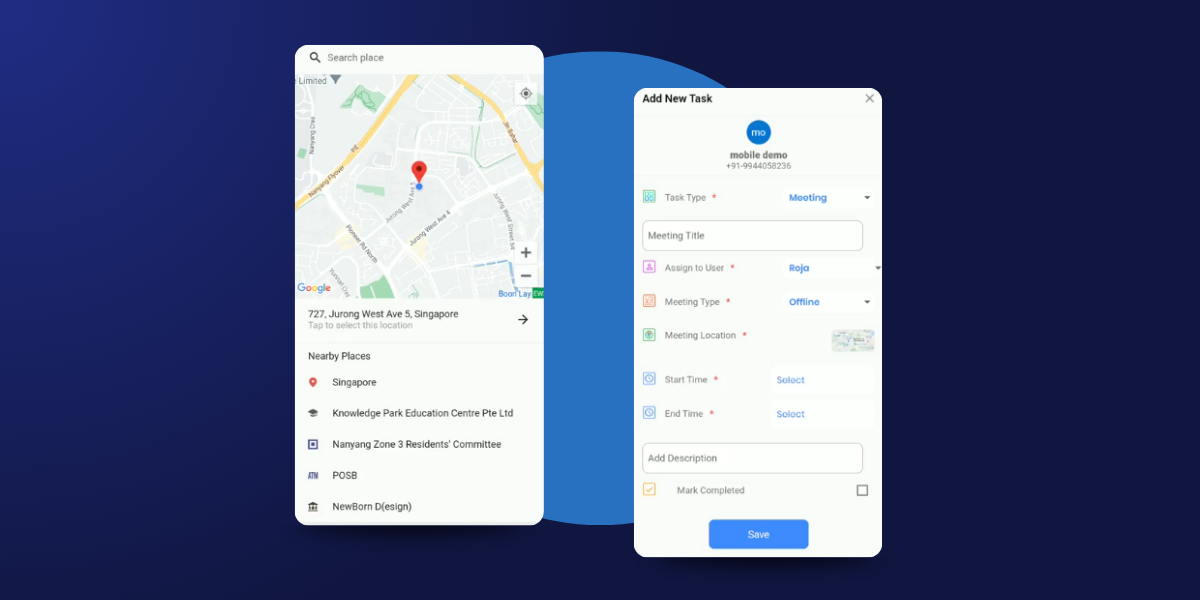
#1 The RevOps advantage on mobile
Mobile access is useful. Revenue visibility on mobile is transformational.
The Corefactors AI mobile app combines real time execution with AI driven intelligence. Teams move deals forward in the field while leadership monitors pipeline health, collections, and targets instantly. Built for Android and iOS, it supports offline access with automatic sync once connectivity returns. Even in low signal areas, work does not stop.
#2 AI driven dashboards and predictive insights
How often do managers wait until evening to understand what happened during the day?
Live dashboards show KPIs, pipeline movement, recovery performance, and revenue targets in real time. AI based lead scoring highlights prospects most likely to convert, helping reps prioritize smarter visits. Instead of reacting late, leaders see patterns early and act with confidence.
#3 360 degree task and contact management
Before walking into a meeting, does your rep have full context?
Field teams can access complete lead and customer history including notes, files, interaction timelines, and deal status. Tasks are prioritized by stage, value, and urgency. Automated reminders reduce missed follow ups. Quick filters and one touch updates keep execution fast and practical.
#4 Smart communication and AI call intelligence
Why switch between apps to call, message, and then manually log updates?
Reps can call, send SMS, or connect on WhatsApp directly from the CRM. Conversations are auto logged. AI driven analytics provide call insights and smarter scoring. Integrated telephony with credit tracking gives managers full communication visibility without chasing activity reports.
#5 Document management and instant E Sign
How many deals slow down because paperwork waits for office hours?
Contracts, invoices, and supporting files are accessible within the app. Integrated e signatures allow instant approvals in the field. Deals move from discussion to confirmation without unnecessary delay.
#6 Geo tracking and verified field visits
Is field productivity visible or assumed?
Real time GPS tracking captures visit check ins and route history. Configurable geo precision supports reimbursement validation and proof of meeting. Leaders gain clarity into territory coverage without manual reporting or guesswork.
#7 Attendance with location validation
Workforce tracking often depends on trust alone. What if attendance aligned with actual field presence?
Mobile punch in and punch out links attendance to geo validation. Detailed exports support payroll processing and performance analysis. Accountability improves without adding administrative burden.
The Bottom Line?
Corefactors AI Mobile CRM connects field action directly to revenue visibility. From capturing a trade show lead to logging a recovery payment, every update syncs instantly with the unified web CRM.
Teams stay agile in the field. Leadership tracks productivity, pipeline health, and risk in real time. Mobility does not just provide access. It drives measurable revenue outcomes.

Heading 1
Heading 2
Heading 3
Heading 4
Heading 5
Heading 6
Lorem ipsum dolor sit amet, consectetur adipiscing elit, sed do eiusmod tempor incididunt ut labore et dolore magna aliqua. Ut enim ad minim veniam, quis nostrud exercitation ullamco laboris nisi ut aliquip ex ea commodo consequat. Duis aute irure dolor in reprehenderit in voluptate velit esse cillum dolore eu fugiat nulla pariatur.
Block quote
Ordered list
- Item 1
- Item 2
- Item 3
Unordered list
- Item A
- Item B
- Item C
Bold text
Emphasis
Superscript
Subscript
Frequently Asked Questions (FAQs)
What is mobile CRM?


Mobile CRM or mobile customer relationship management enables teams to access, update, and manage customer data directly from smartphones and tablets while they are away from their desks. It extends the core CRM system to mobile devices so work does not pause when someone leaves the office.
What are the benefits of mobile CRM?
There are several benefits to mobile CRM, including better customer conversations, cleaner pipeline, faster sales cycle movement, more accurate forecasting, higher team adoption, higher ROI from CRM investment, stronger productivity and performance visibility.
What are the common pitfalls to avoid when implementing mobile CRM?
Common pitfalls in mobile CRM implementation include unclear objectives, poor user adoption planning, and weak data synchronization between devices. Organizations also struggle when they migrate inaccurate data or overcomplicate features early on. Without proper integration and training, mobile CRM fails to deliver productivity and customer engagement benefits.
Which CRM has the best mobile app?
Corefactors offers one of the best mobile CRM apps for growing sales teams, with real-time lead tracking, instant follow-ups, and seamless pipeline updates on the go. Its clean interface and strong integration capabilities make it especially effective for field sales and fast-moving revenue teams.
Is mobile CRM secure for handling customer data?
Yes, modern mobile CRM platforms use encryption, role-based access controls, and secure cloud infrastructure to protect customer data. When configured properly with authentication and device security policies, mobile CRM is as secure as desktop systems while offering greater flexibility.







.png)


.png)