

How to Choose the Best CRM Software for Your Business

Heading 1
Heading 2
Heading 3
Heading 4
Heading 5
Heading 6
Lorem ipsum dolor sit amet, consectetur adipiscing elit, sed do eiusmod tempor incididunt ut labore et dolore magna aliqua. Ut enim ad minim veniam, quis nostrud exercitation ullamco laboris nisi ut aliquip ex ea commodo consequat. Duis aute irure dolor in reprehenderit in voluptate velit esse cillum dolore eu fugiat nulla pariatur.
Block quote
Ordered list
- Item 1
- Item 2
- Item 3
Unordered list
- Item A
- Item B
- Item C
Bold text
Emphasis
Superscript
Subscript

How to Choose the Best CRM Software for Your Business
.png)
Karthik A
Join us on November 6th as Mr. Yash Mishra, Product Manager, Fatakpay, reveals the precise strategies that eliminates the speed trap and guarantees a 30% conversion boost.
Choosing the right CRM starts with being clear on what you actually want the system to help you achieve. That could be better lead management, cleaner reporting, smoother follow ups, or reducing manual work. Without this clarity, it is easy to get distracted by features that look impressive but add little value to your day to day operations.
The truth is, the ideal customer relationship management (CRM) platform is not the one with the most features. It is the one that fits how your business actually works. Your sales cycle, your team size, your customer journey, and your growth plans matter far more than flashy dashboards or long feature lists.
A good CRM should feel like a natural extension of your workflow, not another system your team has to work around. When chosen well, it simplifies decisions, speeds up execution, and brings clarity across teams. When chosen poorly, it becomes an expensive spreadsheet that nobody trusts.
This is why choosing the right CRM is less about software and more about understanding your business first, then finding a tool that supports it.
How to Choose the Best CRM: 11 Factors to Consider
Choosing a CRM is not a software decision. It is an operating model decision. The CRM you choose will shape how your teams sell, follow up, report, and collaborate for years.
Most CRM failures do not happen because the product is weak. They happen because the selection was based on features and price, not on how the business actually works.
Here are the eleven factors for how to choose the best CRM:
1. Identify goals and process gaps
2. Define core CRM features and capabilities
3. Shortlist CRM vendors by business fit
4. Choose cloud vs on-premise deployment
5. Check reviews and case studies
6. Evaluate usability and team adoption
7. Evaluate usability and team adoption
8. Review reporting and analytics
9. Test business fit through structured demos
10. Assess integration, governance, and compliance
11. Analyze total cost, risk, and long-term roadmap
Let’s take a closer look.
1. Identify Goals and Process Gaps
Before evaluating any platform, conduct an internal assessment of how revenue moves through your organization today. The goal is to understand where momentum slows, where ownership becomes unclear, and where leadership loses visibility.
Review your current process across key stages:
- Lead capture and qualification
- Handoffs between marketing, sales, and post-sale teams
- Deal progression and forecasting
- Customer onboarding and ongoing engagement
Common friction points include delayed follow-ups, inconsistent data entry, unclear accountability, and limited insight into pipeline health. Document these gaps and convert them into specific operational outcomes, such as faster response times, cleaner handoffs, or more reliable forecasting. These outcomes form the foundation for your CRM requirements.
2. Define Core CRM Features and Capabilities
Once gaps are clear, define what the CRM must support on a daily basis. For most organizations, this extends far beyond storing contact information.
A modern CRM typically needs to enable:
- Lead and opportunity tracking across the full pipeline
- Telephony and IVR integration for inbound and outbound engagement
- Conversation intelligence for call review and coaching
- Mobile application access for field and remote teams
Sales teams using mobile CRM hit their quotas 65% of the time, while only 22% succeed without it, according to CRM.org. Each missing capability creates a dependency on external tools or manual work. Over time, this fragments workflows and weakens data consistency. The goal is to centralize execution within a single system wherever possible.
Each missing capability creates a dependency on external tools or manual work. Over time, this fragments workflows and weakens data consistency. The goal is to centralize execution within a single system wherever possible.
3. Shortlist CRM Vendors by Business Fit
Once your operational requirements are clear, move from internal analysis to market evaluation.
The best CRM software in 2026 include:
1. Corefactors.ai
2. Salesforce
3. HubSpot
4. Zoho CRM
5. Pipedrive
However, brand visibility should never be the primary filter.
CRM platforms are built for different segments, industries, and levels of organizational complexity. Some prioritize rapid deployment and simplicity for SMB and high-velocity sales models. Others focus on governance, customization, and scalability for enterprise environments.
When building your shortlist, assess each vendor against:
- Alignment with your company size and growth trajectory
- Industry relevance and domain expertise
- Depth of workflow and process control
- Support for governance, permissions, and regional scale
The goal is to narrow the field to platforms designed for how your business actually operates, not those with the strongest market presence.
4. Choose Cloud vs On-Premise Deployment
Deployment affects scalability, governance, and long-term risk management.
Cloud-based CRM software offer rapid implementation, continuous updates, and lower technical overhead. They are well suited for distributed teams and fast-growing organizations.
On-premise platforms provide greater control over data storage and system access. They can be necessary for organizations with strict regulatory, security, or data residency requirements, but they demand higher upfront investment and internal IT support.
Select a deployment model based on future compliance needs, geographic expansion, and internal governance capabilities, not just current convenience.
5. Check Reviews and Case Studies
Vendor websites highlight ideal use cases. Customer feedback reveals how systems perform under real operating conditions.
When reviewing platforms like G2 or analyzing case studies, focus on practical signals such as:
- How long implementation and data migration actually took
- What user adoption looked like after the first few months
- How responsive and effective support was during critical issues
Look for recurring patterns rather than isolated opinions. Consistent themes often indicate how the platform behaves after the initial rollout and early enthusiasm fades.
This step helps you avoid selecting a CRM that performs well in demonstrations but struggles to deliver stability and value in day-to-day operations.
To see how this plays out in real businesses, explore real customer stories here.
6. Evaluate Usability and Team Adoption
Even the most powerful CRM fails if teams do not use it consistently.
During trials or demos, assess:
- The number of steps required to complete common tasks
- The clarity of navigation and screen layouts
- The learning curve for new users
Also evaluate the vendor’s onboarding and training model. Role-based training, documentation quality, and ongoing support resources play a significant role in how quickly teams become productive.
7. Assess Automation and Workflow Control
Automation should reinforce standards, not just reduce manual work.
A well-designed CRM helps:
- Enforce required steps in workflows
- Trigger follow-ups and escalations automatically
- Prevent incomplete records from progressing through the pipeline
As organizations scale, managers cannot manually monitor every deal or activity. Process controls embedded in the system help maintain consistency and accountability.
8. Review Reporting and Analytics
Reporting should provide insight, not just activity summaries.
Strong CRM platforms enable leaders to:
- Identify where deals drop off or stall
- Track pipeline velocity and aging
- Forecast based on historical patterns and real-time data
Evaluate how flexible the reporting tools are and whether dashboards can be tailored to different roles, such as sales leadership, marketing operations, and customer success managers.
9. Test business fit through structured demos
Avoid generic product tours. Use demos to simulate real operations.
Ask vendors to demonstrate:
- Your lead routing and qualification rules
- Your approval or escalation workflows
- Your standard reports and forecasting views
Bring real scenarios and edge cases. This approach reveals whether the platform can support your processes without extensive customization or external tools.
10. Assess Integration, Governance, and Compliance
As the CRM becomes your system of record, control becomes as important as flexibility. Governance should be embedded into daily workflows, not added as a separate process.
Evaluate:
- Communication Governance: Connect channels like WhatsApp, telephony, and email through official APIs to centralize conversations and keep customer data within the organization.
- Role-Based Access and Permissions: Define granular controls for viewing, editing, and exporting data to protect sensitive information across teams.
- Audit Trails and Data History: Maintain a time-stamped record of interactions and changes to support transparency and compliance.
- Regional Compliance and Data Residency: Confirm alignment with standards such as GDPR or ISO/IEC 27001:2022 and support for regional data requirements.
This reduces legal risk, limits data misuse, and keeps operations manageable as the organization scales. Platforms like Corefactors embed these controls directly into the lead-to-revenue workflow rather than treating them as separate layers.
11. Analyze total cost, risk, and long-term roadmap
The cost of a CRM extends beyond subscription fees.
Account for:
- Implementation and data migration
- Customization and system administration
- Training and ongoing user support
- Integration maintenance
Review the vendor’s product roadmap to understand how the platform will evolve. Consider whether their investment priorities align with your future needs around automation, analytics, and governance.
The right CRM is not defined by the number of features it offers, but by how effectively it supports daily execution, leadership visibility, and long-term growth. When selected with a clear understanding of internal processes, governance needs, and future direction, a CRM becomes more than a software platform. It becomes the operational backbone of your revenue organization.
Taking the time to evaluate these eleven factors can significantly reduce implementation risk and increase the likelihood that your CRM investment delivers sustained business value.
.png)
Implementation Strategies for Your Chosen CRM
Choosing a CRM is only the beginning. A simple, well executed implementation matters more than a perfect design.
Here are practical strategies that keep implementation clean and effective.
- Start with only the core workflows you need to run daily.
- Migrate only clean and relevant data into the new system.
- Set up basic roles and access controls before inviting users.
- Train users on how to do their real work inside the CRM.
- Go live with a small group first before rolling out to everyone.
- Fix usability issues early based on real user feedback.
- Keep automation simple in the first phase and expand later.
- Track adoption weekly and follow up where usage is low.
- Assign one internal owner to manage changes and questions.
- Stabilize the system before adding more features or teams.
A successful CRM implementation is not about complexity. It is about clarity, discipline, and steady execution. When done right, the CRM quickly becomes a system your teams trust and rely on every day.
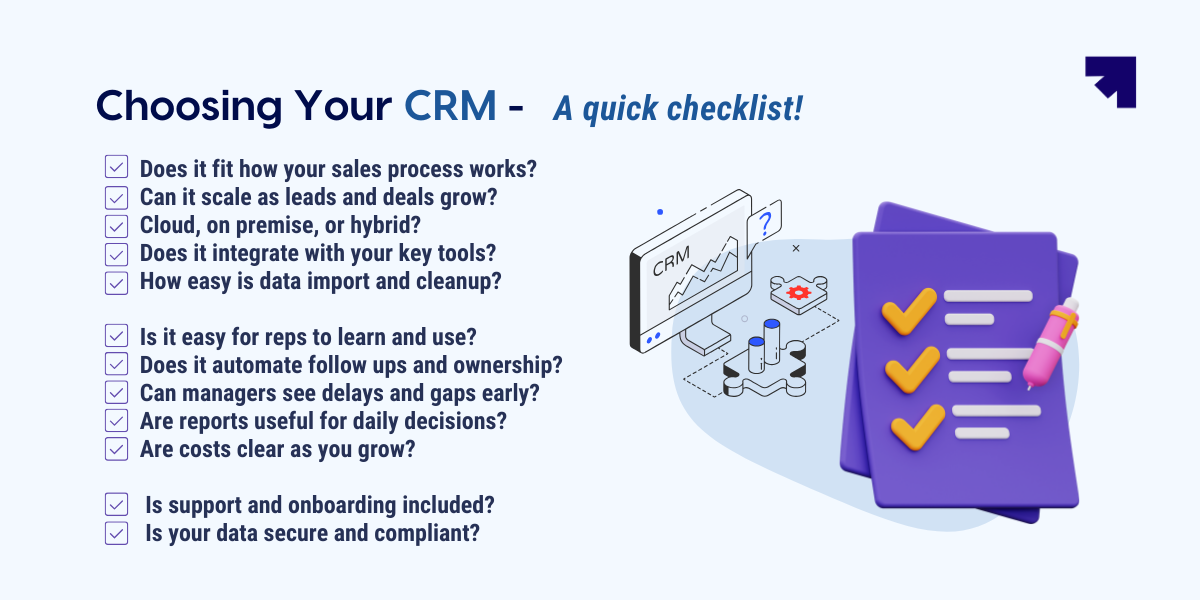
Now that you know how to roll it out the right way, here is a simple checklist to help you choose the right CRM from the start.
Top 4 Mistakes to Avoid While Choosing a CRM System
Most CRM failures do not happen after implementation. They happen at the time of selection.
Teams often choose a CRM based on brand, price, or surface features, and only later discover that the system does not fit how they actually work.
Here are four critical mistakes that consistently lead to poor CRM outcomes.
1. Choosing a CRM based on features instead of fit
One of the most common mistakes is selecting a CRM because it looks powerful on paper. Feature lists are easy to compare. Process fit is harder to evaluate.
A CRM can offer advanced automation, AI, and analytics, and still fail if it does not align with your sales motion, deal complexity, or team structure. When the tool forces your team to change natural workflows just to fit its design, adoption quickly drops.
The right approach is to start from your business model and selling process, and then evaluate whether the CRM supports that reality without constant workarounds.
2. Ignoring the needs of frontline users
Many CRM decisions are driven by leadership and IT, with little involvement from the people who will use the system every day. This creates a dangerous gap between what looks good in demos and what works in real life.
Sales and service teams care less about advanced dashboards and more about how fast they can update records, log calls, and schedule follow ups while working under pressure. When the system feels slow or complicated, usage declines naturally.
As usage drops, data quality degrades. As data quality degrades, reporting loses credibility. This entire chain often starts with ignoring the user experience at the time of selection.
3. Underestimating implementation and change management effort
Another major mistake is assuming that buying a CRM is the hard part. In reality, implementation determines whether the system succeeds or fails.
A poorly implemented CRM leads to confusing stages, wrong data structures, broken workflows, and frustrated users from the first week. Even a strong product can fail if the setup does not reflect real processes.
Beyond technical setup, change management is equally important. Teams need clear processes, contextual training, and ongoing support. Without this, CRM adoption remains superficial and the CRM never becomes part of daily work.
4. Focusing only on short term cost instead of long term value
Many organizations choose a CRM primarily based on license price. This is risky, because license cost is only a small part of the true investment.
Over time, you also pay in the form of customization effort, integration complexity, admin overhead, and productivity loss when the system slows people down or limits growth.
A cheaper CRM that constrains your business can become far more expensive than a higher quality system that scales cleanly. The right question is not which CRM is cheapest today, but which CRM will create the most value over the next five years.
Bottom line?
Choosing a CRM is a considered decision, but it doesn’t need to feel overwhelming. When you evaluate options with clear criteria and a strong understanding of how your business actually runs, the right choice becomes much easier. The steps above are meant to help you move forward with clarity and avoid costly misfits.
For growing businesses that need execution, visibility, and control without unnecessary complexity, Corefactors.ai is built to fit real revenue workflows. It brings lead management, integrated telephony, AI powered call intelligence, automation, and reporting into one connected platform that scales with your team instead of slowing it down.
The most reliable way to assess a CRM is to experience it in real conditions. Want to see if a CRM actually fits your business before committing to it? For eligible startups, Corefactors.ai offers the full RevOps CRM free for up to one year. Other businesses can start with a 7 day free trial with no credit card required.
👉 Learn more
Heading 1
Heading 2
Heading 3
Heading 4
Heading 5
Heading 6
Lorem ipsum dolor sit amet, consectetur adipiscing elit, sed do eiusmod tempor incididunt ut labore et dolore magna aliqua. Ut enim ad minim veniam, quis nostrud exercitation ullamco laboris nisi ut aliquip ex ea commodo consequat. Duis aute irure dolor in reprehenderit in voluptate velit esse cillum dolore eu fugiat nulla pariatur.
Block quote
Ordered list
- Item 1
- Item 2
- Item 3
Unordered list
- Item A
- Item B
- Item C
Bold text
Emphasis
Superscript
Subscript
Frequently Asked Questions (FAQs)
How to choose the right CRM software?


To choose the right CRM software, start by defining your core business goals and process gaps, such as lead management, follow ups, or pipeline visibility. Then, shortlist tools that offer the essential features you need, are easy for your team to adopt, and can scale as you grow. Finally, involve key stakeholders in demos and free trials to test real workflows before you decide.
2. What CRM features should I prioritize in 2026?
Beyond basic contact management, essential modern features include no-code automation, omnichannel communication (especially WhatsApp integration), and built-in AI for lead scoring and predictive insights.
3. Does the CRM integrate with my existing tools?
A critical question is whether the CRM connects seamlessly with current email (Gmail/Outlook), marketing platforms, and accounting software to prevent data silos and manual entry.
4. What is the best CRM software in 2026?
The best CRM software in 2026 include: 1. Corefactors.ai 2. Salesforce 3. HubSpot 4. Zoho CRM 5. Pipedrive
5. How can a free trial help me find the best CRM?
A CRM free trial is the fastest way to find the best CRM for your business, not just compare features. It lets you test real workflows, lead routing speed, and follow up discipline. You can assess team adoption, reporting clarity, and integration friction early. If it improves conversion flow and manager visibility, it is the right fit.







.png)


.png)