


Role of CRM in Business: Functions, Benefits & Use Cases
%20(1).png)
Karthik A
Join us on November 6th as Mr. Yash Mishra, Product Manager, Fatakpay, reveals the precise strategies that eliminates the speed trap and guarantees a 30% conversion boost.
Why do many businesses invest in a CRM but still struggle to manage leads, follow-ups, and deals effectively? This often happens when teams treat CRM like a contact database instead of understanding the actual role of CRM in the business.
Leads get stored, activities get logged, but the system does not really guide how customer relationships should be managed. Studies show that 57% of businesses see increased sales revenue as a key benefit of using CRM software.
When the role of CRM is unclear, processes start breaking down. Follow-ups get delayed, data becomes messy, and opportunities quietly slip through the pipeline. Understanding its role helps businesses turn the system into a structured engine for managing customers, sales activities, and revenue growth. In this blog, we will explore the role of CRM across different departments, its key functions, and the benefits it brings to everyday operations.
What is CRM?
CRM (Customer Relationship Management) is software that helps businesses manage interactions with prospects and customers in one place. It stores contact details, tracks conversations, and organizes sales activities so teams can clearly see every interaction.
Instead of information scattered across spreadsheets, emails, and personal notes, a CRM centralizes everything inside one system. Sales, marketing, and support teams can access the same customer information and interaction history.
A typical CRM helps businesses:
- Capture and store leads from different channels
- Track deals and sales pipelines
- Manage follow-ups, tasks, and reminders
- Record calls, emails, and customer interactions
- Analyze sales performance and customer data
As businesses grow, customer conversations increase. Enquiries arrive from multiple channels, deals move through different stages, and follow-ups become harder to track manually. CRM brings structure to these interactions so teams can manage relationships and opportunities more effectively.
What is the role of CRM?
The role of CRM is to organize how a business manages customer relationships throughout the revenue journey. It connects customer data, sales activities, and communication history so teams can track interactions and make informed decisions.
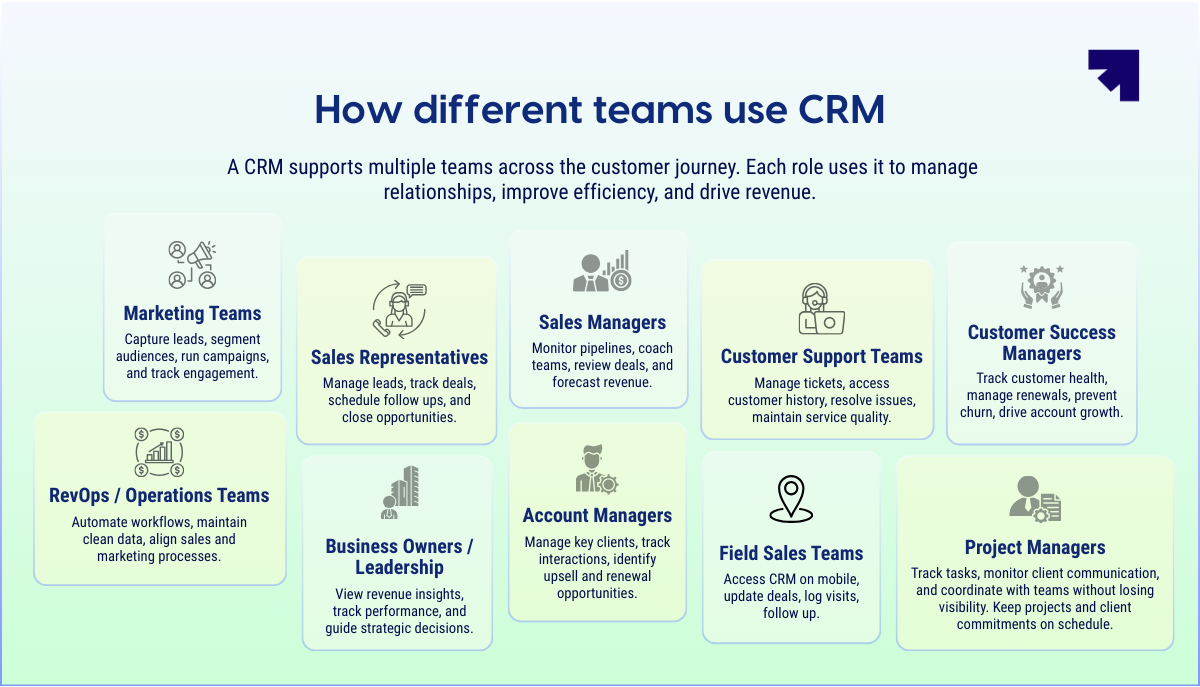
CRM primarily supports teams that work directly with customers. Sales teams manage opportunities, marketing teams generate and nurture leads, and customer success teams maintain ongoing relationships.
At a broader level, CRM helps businesses:
- Maintain a structured sales process
- Ensure customer information is accessible to the right teams
- Track deal progress and customer interactions
- Maintain accountability for follow-ups and actions
- Provide visibility into sales performance and pipeline health
With this structure in place, CRM becomes the system businesses rely on to manage their customer-facing operations.
.png)
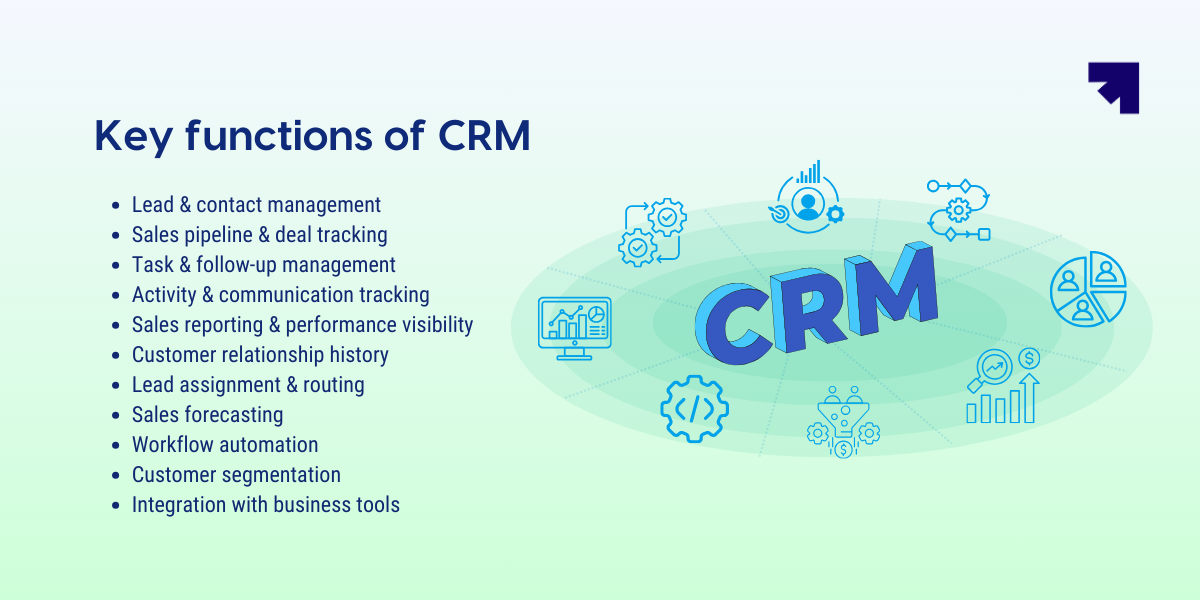
Key functions of CRM: how CRM supports daily business operations
Once implemented, CRM becomes part of everyday workflows. Teams use it to track leads, manage deals, and coordinate customer interactions across departments.
These operational functions are what make CRM valuable on a daily basis.
1. Lead and contact management
CRM stores all prospect and customer information in one centralized database. Leads can enter through forms, calls, emails, campaigns, or referrals.
Sales teams can immediately see contact details, company information, and conversation history before engaging with a prospect.
2. Sales pipeline and deal tracking
CRM allows businesses to structure their sales process into clear stages. Deals move from enquiry to qualification, proposal, negotiation, and closure.
This pipeline view helps teams understand deal progress and identify opportunities that require attention.
3. Task and follow-up management
Consistent follow-ups are critical in sales. CRM helps teams create reminders, tasks, and meeting schedules linked to each prospect or deal.
This ensures enquiries do not get ignored and opportunities continue moving forward.
4. Activity and communication tracking
Every interaction with a customer can be logged inside the CRM. Calls, emails, messages, and meeting notes become part of the customer timeline.
This gives teams full context before continuing a conversation.
5. Sales reporting and performance visibility
CRM provides reports and dashboards that track pipeline value, deal progress, and conversion rates.
Managers can use these insights to monitor performance and identify areas that need improvement.
6. Customer relationship history
CRM maintains a long-term record of customer interactions and purchases. Teams can review previous conversations and preferences at any time.
This historical view helps businesses maintain stronger relationships and provide more informed customer support. As multiple teams begin using CRM, the system becomes a shared source of truth for customer interactions across the organization.
7. Lead assignment and routing
When leads enter the CRM, they often need to be assigned to the right salesperson. This can depend on territory, product type, industry, or lead source.
CRM systems can automatically route leads to the appropriate team member. This prevents delays and ensures prospects receive a quick response. Automatic assignment also improves accountability because every lead has a clear owner.
8. Sales forecasting
CRM helps managers estimate future revenue based on current pipeline data. Deal value, probability, and expected closing dates provide insight into upcoming sales performance.
This helps leadership teams plan hiring, inventory, and marketing investments with better confidence. Accurate sales forecasting also helps businesses identify gaps early if revenue targets are at risk.
9. Workflow automation
Many repetitive tasks in sales can be automated through CRM workflows.
For example, the system can automatically send follow-up reminders, trigger emails after meetings, update deal stages, or assign tasks when a lead enters the pipeline.
Workflow automation reduces manual work and ensures important actions happen consistently.
10. Customer segmentation
CRM allows businesses to group contacts based on attributes such as industry, location, purchase history, or engagement level.
These segments help marketing and sales teams run targeted campaigns and personalized outreach. Better segmentation leads to more relevant communication with prospects and customers.
11. Integration with business tools
CRM rarely operates in isolation. Most systems integrate with tools such as email platforms, marketing automation software, calling systems, and customer support tools.
These integrations allow data to flow between systems so teams can work without switching between multiple applications. This creates a more connected and efficient operational environment.
What is the role of CRM in marketing?
Marketing teams focus on generating leads and nurturing prospects. CRM helps them capture enquiries, understand customer behavior, and track campaign outcomes.
Without CRM, lead data often sits across multiple marketing tools. Bringing this information into one system creates a clearer view of the funnel.
1. Lead capture and management
CRM collects leads from multiple sources including website forms, landing pages, ads, events, and campaigns. All lead information flows into a centralized database.
2. Lead segmentation and targeting
Marketing teams can segment leads based on industry, location, campaign source, or buying stage. Segmentation helps teams send more relevant communication.
3. Campaign tracking and attribution
CRM tracks where leads originate and how they interact with campaigns. Marketing teams can identify which channels generate qualified prospects.
4. Lead nurturing
Many prospects need time before making a purchase decision. CRM helps marketing teams nurture them through campaigns, emails, and reminders. This keeps the brand present throughout the buying journey.
Also read: Lead Nurturing Strategies to Increase Sales and Revenue
5. Marketing and sales alignment
CRM creates a shared view of leads and opportunities. Marketing can see which leads convert while sales can review campaign history. While marketing and sales focus on acquisition, CRM also plays an important role after the sale.
At a glance, the role of CRM in marketing is to capture leads, track campaign impact, and ensure prospects move smoothly from marketing engagement to sales conversations.
Role of CRM in sales
Sales teams handle constant conversations, follow-ups, and deal movement. CRM helps them manage these activities with structure and visibility.
Instead of scattered notes and email threads, every prospect and deal sits inside one organized pipeline.
1. Organizing leads and prospects
CRM captures leads from forms, calls, campaigns, and referrals. Each prospect record stores contact details and interaction history.
Sales representatives can understand the context before reaching out.
2. Managing the sales pipeline
Deals move through defined stages such as qualification, proposal, negotiation, and closure.
The pipeline view helps teams track progress and focus on deals that require action.
3. Ensuring consistent follow-ups
Missed follow-ups often lead to lost deals. CRM allows sales teams to create reminders, tasks, and meeting schedules.
This ensures prospects receive timely responses.
4. Tracking sales activities
Every call, meeting, and email gets recorded within the CRM timeline.
Managers and team members can easily review the history of each opportunity.
5. Sales visibility and forecasting
CRM provides a clear view of pipeline health and expected revenue. Managers can track deal values, conversion rates, and sales progress.
This visibility helps businesses forecast revenue more accurately. Sales teams are not the only ones benefiting from CRM. Marketing teams also rely on it to manage lead generation and campaign performance.
In simple terms, the role of CRM in sales is to structure the sales process, maintain visibility on deals, and ensure opportunities move forward without being overlooked.
Also read: Impact of CRM on Sales Productivity and Performance
Role of CRM in customer service
Customer service teams manage support requests, questions, and post-purchase interactions. CRM helps them respond faster with the right context.
Instead of searching through email threads or chat logs, agents can quickly access the full customer history.
1. Centralized customer information
CRM stores contact details, purchase records, and previous conversations. Support teams can understand the customer's background before responding.
2.Case and ticket management
Customer issues can be logged as tickets and assigned to the appropriate team member. Each request remains visible until it is resolved.
3. Interaction tracking
Every call, message, and support note becomes part of the customer timeline. Agents can review previous interactions before continuing the conversation.
4. Faster issue resolution
Structured ticket management and clear information help teams resolve issues faster. Requests can also be routed to the right specialist.
5. Customer experience insights
CRM provides visibility into response times, recurring issues, and service performance. Managers can use this data to improve support processes. As multiple teams start using CRM, defining clear responsibilities becomes essential.
In short, the role of CRM in customer service is to organize customer support interactions, resolve issues efficiently, and deliver a more consistent customer experience.
Role of CRM in management
A CRM helps managers gain clear visibility into sales activity, customer interactions, and revenue progress. It brings operational data into one system. This allows leadership teams to monitor performance and guide decisions.
Managers often struggle when information sits across spreadsheets and tools. CRM removes this fragmentation. It shows the full picture of leads, deals, and customer engagement in real time.
1. Sales pipeline visibility
CRM gives managers a clear view of the sales pipeline. They can see how many deals exist at each stage. This helps them understand pipeline health and potential revenue.
2. Team performance monitoring
CRM tracks activities such as calls, meetings, and follow-ups. Managers can review how consistently the team engages prospects. This visibility helps identify productivity gaps and coaching opportunities.
3. Revenue forecasting
CRM provides data on deal stages, deal values, and expected closure timelines. Managers can estimate future revenue based on pipeline progress. This helps leadership plan budgets and resources more accurately.
4. Process standardization
CRM helps organizations define a structured sales process. Teams follow consistent stages and workflows. This reduces confusion and improves operational discipline.
5. Data-driven decision making
CRM reports provide insights into conversion rates, campaign outcomes, and customer trends. Managers can identify bottlenecks and improve strategy.
In a nutshell, the role of CRM in management is to provide visibility, improve accountability, and support better business decisions using structured customer and sales data.
5 Benefits of defining CRM roles
Implementing a CRM does not automatically improve how a business manages customers. The real impact comes when teams clearly understand who is responsible for what inside the CRM.
Defining CRM roles creates structure around how leads are handled, how deals progress through the pipeline, and how customer interactions are recorded. When responsibilities are unclear, information gets missed, follow-ups are delayed, and teams often duplicate work.
Clear CRM roles turn the system into an operational framework that helps teams manage customers, opportunities, and internal coordination more effectively. Here are some of the key business benefits of defining CRM roles.
#1 Better operational accountability
When CRM roles are clearly defined, every lead, deal, and customer interaction has a responsible owner.
Sales representatives manage their assigned leads and opportunities. Marketing teams maintain lead sources and campaign data. Customer support teams track service requests and resolutions. Managers oversee performance and pipeline movement.
Because ownership is visible inside the CRM, tasks are less likely to be ignored or delayed. If a deal stops progressing or a follow-up is missed, managers can quickly identify where the gap occurred.
This accountability encourages teams to maintain discipline in updating records and progressing opportunities.
#2 More reliable and structured customer data
Customer data only becomes valuable when it is consistently updated and trusted by the team.
Defining CRM roles helps maintain this consistency by assigning responsibility for specific data points. Marketing records campaign sources and lead attributes. Sales teams update deal stages, opportunity values, and conversation notes. Support teams log service interactions and issue resolutions.
Because each team owns certain information, records remain organized and complete. This prevents duplicate entries, outdated deal stages, or missing customer context.
Reliable data also improves reporting. Managers can analyze pipeline health, campaign performance, and customer behavior with greater confidence.
#3 Faster response and follow-ups
Many opportunities are lost simply because businesses fail to respond quickly or maintain consistent follow-ups.
Defined CRM roles ensure every enquiry or opportunity has an assigned owner responsible for the next action. Leads can be automatically routed to the appropriate salesperson, while customer issues can be directed to the correct support agent.
The CRM can also trigger reminders and task notifications linked to these roles. This keeps conversations active and ensures prospects receive timely responses.
Faster follow-ups not only improve customer experience but also increase the likelihood of keeping opportunities engaged throughout the sales cycle.
#4 Higher sales conversions
When CRM roles are clearly defined, the sales funnel operates more efficiently.
Marketing teams focus on generating and qualifying leads before handing them to sales. Sales representatives concentrate on progressing deals instead of sorting through incomplete or unqualified enquiries. Managers can track deal movement and quickly identify stages where opportunities slow down.
This structured pipeline ensures leads receive timely attention and conversations remain organized. As a result, opportunities move forward with fewer delays and a higher probability of closing.
#5 Better management visibility and decision making
CRM roles also help leadership teams gain clearer visibility into business performance.
Because each team updates the information they are responsible for, pipeline data remains accurate and current. Managers can review dashboards to understand how leads are progressing, which deals are active, and where revenue is likely to come from.
This visibility allows leadership to identify bottlenecks early, support sales teams more effectively, and make better strategic decisions.
Also read: Top 10 Benefits of CRM Software in 2026
Example of how businesses use CRM
Imagine a small B2B company that sells office equipment to other businesses. Most enquiries arrive through their website, WhatsApp, and phone calls.
Before using a CRM, the team tracks leads in spreadsheets and personal notes.
When a new enquiry arrives, the sales executive creates a lead inside the CRM. The system stores the contact details, company name, and enquiry source. The executive also schedules a follow-up call.
During the sales process, every conversation gets recorded. The salesperson updates the deal stage after each interaction. Managers can see which deals are progressing and which need attention.
If the customer requests a quote, the proposal gets attached to the deal record. When the customer calls again later, anyone on the team can open the CRM and review the entire conversation history.
After the deal closes, the customer record remains in the system. The support team can see purchase history and past interactions.
Over time, the CRM becomes the central place where the business tracks enquiries, manages deals, and maintains customer relationships.
Who should use a CRM?
A CRM becomes valuable when customer conversations start increasing. Leads arrive from multiple channels. Deals remain active at the same time. Follow-ups begin to depend on memory or scattered notes.
Information slowly spreads across emails, calls, spreadsheets, and chat apps. At this stage, teams start losing visibility into what was discussed, who owns the deal, and what the next step should be. CRM introduces structure by organizing customer data, tracking interactions, and guiding how opportunities move forward.
1. Startups
Startups often believe CRM is something they need later. In the early stage, sales conversations usually sit with the founder or a small team.
Leads may come from LinkedIn messages, website forms, referrals, or networking events. These conversations happen across multiple platforms, and it becomes difficult to remember where each prospect stands.
As the startup begins hiring sales representatives or handling more opportunities, earlier conversations become harder to track. A CRM helps capture those leads from day one, record interactions, and create a clear sales process that the growing team can follow.
2. Small businesses
Small businesses typically experience a steady increase in enquiries as they gain more customers.
Sales teams often track prospects through spreadsheets, notebooks, or messaging apps. At first this feels manageable, but it becomes difficult once several deals are active simultaneously.
Customer information ends up scattered across different tools, and team members may not always know the latest update on a deal. A CRM centralizes this information and gives the entire team a shared view of prospects, conversations, and deal progress.
3. Growing sales teams
As businesses expand, sales teams grow and responsibilities become more distributed.
Multiple representatives begin managing different territories, products, or customer segments. Managers also need visibility into how deals are progressing across the pipeline.
When deal updates live in personal notes or inboxes, coordination becomes challenging. A CRM brings all opportunities into a structured pipeline, assigns ownership, and allows managers to track performance and pipeline health in real time.
4. Enterprises with multiple sales channels
Larger organizations often generate leads through several channels at the same time.
Inbound marketing campaigns, partner networks, outbound sales teams, events, and regional offices may all bring in prospects. Each channel interacts with customers in different ways.
Bringing these conversations together becomes essential for maintaining a consistent customer experience. A CRM connects these channels and creates a unified customer view, allowing teams across departments to access the same interaction history and work with better coordination.
Once CRM becomes part of everyday operations, the focus shifts from simply managing contacts to selecting a platform that supports how the organization handles sales processes, customer relationships, and long-term growth.

CRM vs ERP: Are they same?
CRM and ERP are often confused because both systems manage important business data and support multiple departments.
However, their primary focus is different.
CRM manages customer relationships and revenue-generating activities, while ERP manages internal operations such as finance, inventory, and resource planning.
Understanding this difference helps businesses select the right system for their needs.
Learn more: CRM vs ERP: 16 Key Differences You Should Know
Why should you choose Corefactors CRM?
Understanding the role of CRM is important. But choosing a CRM that actually works for your team is what makes the real difference.
Many businesses end up using multiple tools for marketing campaigns, sales follow-ups, customer support, and account management. Information gets scattered, teams lose context, and opportunities quietly slip through the cracks.
Corefactors CRM brings everything together into one connected system built around the entire customer journey.
Sales Box helps sales teams stay focused on the right opportunities. AI-powered lead scoring highlights promising prospects, pipelines keep deals organized, and built-in telephony with IVR and call intelligence makes conversations easier to manage. Automated workflows also ensure follow-ups and next actions never get missed.
Marketing Box helps teams run campaigns across email, SMS, and WhatsApp while keeping attribution clear. Leads can be nurtured through structured communication sequences so marketing teams know exactly which activities are generating real opportunities.
Support Box helps customer service teams manage tickets, track SLAs, and resolve issues efficiently. Since all interactions stay connected inside the CRM, agents always have the full customer history before responding.
Success Box focuses on long-term relationships. Teams can track renewals, monitor account health, identify upsell opportunities, and reduce churn by proactively managing customer accounts.
Alongside these modules, Corefactors also provides practical capabilities that make daily work easier:
• Smart lead capture with instant allocation
• Integrated omnichannel communication across calls, IVR, email, SMS, and WhatsApp
• AI-powered call intelligence with automatic reminders
• 360° visibility across every customer interaction
• Automated tasks, reminders, and notifications
• Centralized grievance resolution
• Mobile apps for Android and iOS
The platform is designed with governance in mind as well. Role-based permissions, audit trails, and centralized communication logs help organizations maintain control as they grow. Corefactors is also ISO/IEC 27001:2022 and SOC 2 Type II certified, ensuring strong security and compliance standards.
Startup perk: Get the full CRM free for one year.
For other businesses: Start with a 7-day free trial. Paid plans begin at just ₹199 per user per month.
Ready to see how Corefactors can help you manage leads, conversations, and customer relationships more effectively?
Grow Smarter with RevOps CRM
Frequently Asked Questions (FAQs)
1. What is the main role of a CRM in a business?


The main role of a CRM is to help businesses manage customer relationships in a structured way. It stores customer information, tracks interactions, and organizes sales activities so teams can manage leads, follow-ups, and deals more effectively. By centralizing customer data and communication history, CRM helps teams maintain visibility into the sales pipeline and customer lifecycle.
2. Why is understanding the role of CRM important?
Understanding the role of CRM ensures businesses use the system as an operational tool rather than just a contact database. When teams clearly understand its role, CRM becomes a system for managing customer interactions, coordinating teams, and maintaining visibility into revenue processes.
3. Can small businesses benefit from CRM?
Yes, CRM can be valuable for small businesses once customer enquiries and deals start increasing. It helps organize leads, track conversations, and manage follow-ups more consistently. This structure allows small teams to manage more opportunities without losing track of customer interactions.
4. What happens if a business operates without a CRM?
Without a CRM, customer information often becomes scattered across spreadsheets, emails, and messaging apps. Teams may struggle to track conversations, manage follow-ups, or maintain visibility into deal progress. Over time, this lack of structure can lead to missed opportunities, inconsistent customer communication, and limited insight into sales performance.
5. What are the common roles that use a CRM?
Common CRM users include sales representatives, sales managers, marketing managers, business development executives, account managers, customer support executives, customer success managers, CRM administrators, and business owners. Each role uses CRM to manage different parts of the customer lifecycle.






.png)


.png)