

Sales CRM: How Can it Help Your Business?

Heading 1
Heading 2
Heading 3
Heading 4
Heading 5
Heading 6
Lorem ipsum dolor sit amet, consectetur adipiscing elit, sed do eiusmod tempor incididunt ut labore et dolore magna aliqua. Ut enim ad minim veniam, quis nostrud exercitation ullamco laboris nisi ut aliquip ex ea commodo consequat. Duis aute irure dolor in reprehenderit in voluptate velit esse cillum dolore eu fugiat nulla pariatur.
Block quote
Ordered list
- Item 1
- Item 2
- Item 3
Unordered list
- Item A
- Item B
- Item C
Bold text
Emphasis
Superscript
Subscript

Sales CRM: How Can it Help Your Business?

Karthik A
Join us on November 6th as Mr. Yash Mishra, Product Manager, Fatakpay, reveals the precise strategies that eliminates the speed trap and guarantees a 30% conversion boost.
Sales CRM sounds like just another software until your team starts missing follow-ups, losing track of deals, and struggling to answer a simple question: “What is the exact status of our pipeline right now?” According to industry analysis, the global CRM market size was valued at USD 58.82 Million in 2022 and it is set to see a significant annual compound growth rate of 13.9% from 2023 to 2030.
Many businesses still manage sales through spreadsheets, emails, calls, and personal memory. It may work in the beginning. But as leads increase, conversations get scattered, response time slows down, and visibility starts disappearing. Deals go cold without clear reasons, managers struggle with forecasting, and sales teams spend more time managing chaos than actually selling.
This is exactly why businesses transition to a sales CRM. It brings leads, follow-ups, communication, pipeline tracking, automation, and reporting into one structured system so sales teams can work with more clarity and consistency.
Without a CRM, growth often creates more confusion. With the right CRM, growth becomes easier to manage, track, and scale. In this blog, we will understand what a sales CRM is, how it works, its benefits, features, challenges it solves, and how to choose the right sales CRM for your business.
Key takeaways:
- A sales CRM is a centralized system that helps businesses manage leads, customer interactions, follow-ups, pipeline stages, and sales activities from one place to improve visibility and conversions.
- A sales CRM helps teams avoid missed follow-ups, scattered customer data, unclear pipeline visibility, inconsistent processes, and manual tracking that slow down sales performance and revenue growth.
- A sales CRM manages the complete sales journey from lead capture and qualification to communication tracking, pipeline management, automation, forecasting, and customer retention through one connected workflow.
- Corefactors Sales CRM combines lead management, pipeline visibility, workflow automation, communication tracking, and real-time reporting into one structured platform that helps businesses manage sales more efficiently and scale with better control.

What is a sales CRM?
A sales CRM (Customer Relationship Management software) is a system that helps businesses manage leads, customer interactions, follow-ups, and the entire sales pipeline from one place. It gives sales teams a structured way to track opportunities, manage conversations, and move deals from enquiry to closure without losing visibility.
Many businesses initially manage sales using spreadsheets, emails, WhatsApp chats, sticky notes, or individual memory. This may work when the team is small. But as leads increase, problems start appearing:
- Follow-ups get missed
- Leads remain unattended
- Deal status becomes unclear
- Managers struggle to track pipeline progress
- Customer conversations stay scattered across tools
This is exactly where a sales CRM becomes important.
A sales CRM centralizes everything related to sales. Every lead, call, email, meeting, task, and deal stage stays connected inside one system. Sales teams know what action to take next, managers get real-time visibility into the pipeline, and businesses can forecast revenue more accurately.
Why does your sales team need a sales CRM?
As businesses grow, sales complexity grows with them. More leads, more follow-ups, more conversations, and more deals moving simultaneously. At some point, managing everything manually through spreadsheets, emails, WhatsApp chats, and memory starts breaking down.
This is why sales teams need a sales CRM.
A sales CRM brings structure to how leads are captured, tracked, followed up, and converted. It helps teams manage the complete sales cycle from one place instead of relying on disconnected tools and manual coordination.
Without a CRM, sales often becomes reactive. Teams spend more time searching for information, updating sheets, and figuring out deal status than actually selling.
A CRM changes this by making the entire pipeline visible, organized, and actionable.
1. Keeps every lead and conversation organized
Sales teams handle multiple prospects at different stages daily.
Without a centralized system, customer details remain scattered across calls, emails, spreadsheets, and chats. This creates confusion and increases the risk of missed opportunities.
A sales CRM stores:
- Lead details
- Communication history
- Tasks and reminders
- Deal stages
- Notes and interactions
Everything stays connected in one place, making follow-ups more contextual and efficient.
2. Improves follow-up consistency
One of the biggest reasons deals are lost is poor follow-up.
Leads may show interest initially, but delayed responses or missed callbacks reduce conversion chances quickly.
A CRM helps by:
- Setting automated reminders
- Triggering follow-up tasks
- Tracking pending activities
- Ensuring no lead gets ignored
Consistent follow-up alone can significantly improve sales outcomes.
3. Gives managers real-time pipeline visibility
Without visibility, sales management becomes guesswork.
Managers often struggle to answer:
- Which deals are likely to close?
- Where are the leads getting stuck?
- Which reps need support?
- What is the expected revenue pipeline?
A CRM provides real-time pipeline tracking and reporting so managers can make faster and more informed decisions.
4. Helps sales reps focus more on selling
Manual admin work reduces selling time.
Sales reps often spend hours:
- Updating spreadsheets
- Searching for customer history
- Managing reminders manually
- Preparing status updates
A CRM automates many of these activities, allowing reps to spend more time engaging with prospects and closing deals.
5. Improves collaboration across teams
Sales does not operate alone.
Marketing, customer success, and management often need visibility into customer interactions. A CRM creates a shared system where teams can access updates, track progress, and stay aligned.
This improves coordination and customer experience.
6. Makes forecasting and decision-making easier
Revenue forecasting becomes difficult without accurate data.
A CRM tracks:
- Pipeline movement
- Conversion rates
- Deal stages
- Sales performance
This helps businesses forecast revenue more accurately and plan growth with better confidence.
Also read: What is Sales Forecasting and Why is it Important?
Challenges faced by reps, managers, and businesses & solved by a sales CRM
Challenges faced by sales reps
Sales reps often struggle with:
- Missed follow-ups
- Scattered customer information
- Managing multiple conversations manually
- Lack of visibility into priorities
A CRM solves this by organizing leads, automating reminders, and providing a clear next-step workflow.
Challenges faced by sales managers
Managers face problems like:
- No clear pipeline visibility
- Inaccurate forecasting
- Difficulty tracking team performance
- Lack of accountability
A CRM provides dashboards, reporting, and real-time visibility into sales activities and pipeline health.
Challenges faced by businesses
At the business level, the biggest challenges include:
- Revenue unpredictability
- Lead leakage
- Process inconsistency
- Dependency on individual sales reps
A CRM standardizes the sales process, improves operational control, and ensures customer data stays within the business instead of with individuals.
In a nutshell, a sales CRM is not just a software tool. It becomes the operational system that keeps your sales process structured and scalable.
It helps reps stay productive, managers stay informed, and businesses stay in control of revenue growth instead of relying on scattered processes and manual tracking.
Sales CRM vs. General CRM: What Is the Difference?
This distinction matters when you are choosing a tool for your team.
A general CRM is designed to manage customer relationships across the entire business. It includes sales, marketing, customer support, and often post-sale service. It acts as a shared system of record for all customer-facing teams.
A sales CRM is optimized specifically for the sales motion. It prioritizes pipeline management, deal tracking, follow-up automation, and rep productivity. Every feature is designed to help a sales team move leads to closed deals faster.
In practice, many modern platforms serve both functions. Tools like Corefactors, for instance, combine a dedicated sales pipeline with marketing automation, support ticketing, and customer success modules in a unified system, so teams get the focus of a sales CRM without losing the broader visibility of a general one.
The right question to ask is not "sales CRM or general CRM?" It is "does this system support the way my team actually sells, today and as we grow?"
Also read: CRM vs ERP: 16 Key Differences You Should Know
How does a sales CRM work?
A sales CRM works by managing and organizing every stage of the sales process from lead capture to deal closure and beyond. Instead of sales teams handling information manually across multiple tools, the CRM centralizes all customer interactions, pipeline updates, follow-ups, and reporting into one structured system.
The real value of a sales CRM is not just storing contacts. It is helping businesses move leads through the sales journey systematically without losing visibility, momentum, or customer context.
Let’s understand how a sales CRM works across each stage of the sales process.
1. Lead capture and lead management
The process starts when a lead enters the business.
Leads can come from:
- Website forms
- Ads and campaigns
- Calls and enquiries
- Referrals
- Social media
A sales CRM automatically captures these leads and stores their details in one place. Instead of manually entering data into spreadsheets, leads flow directly into the system.
The CRM also helps:
- Assign leads to sales reps automatically
- Categorize leads by source or priority
- Prevent duplicate entries
- Track where leads are coming from
This ensures faster response time and better lead organization from the beginning.
2. Lead qualification
Not every lead is ready to buy.
During qualification, sales reps assess:
- Customer needs
- Budget
- Timeline
- Decision-making authority
- Intent level
A CRM helps by allowing teams to:
- Add qualification notes
- Score leads based on interest or fit
- Prioritize high-intent opportunities
- Track qualification status clearly
This prevents teams from wasting time on low-quality leads and helps focus effort on opportunities with better conversion potential.
Also read: Using the BANT Framework for Lead Qualification
3. Prospect engagement and communication
Once a lead is qualified, communication begins.
Sales reps interact through:
- Calls
- Emails
- WhatsApp messages
- Meetings
- Demos
A CRM records every interaction automatically or manually so the entire conversation history stays connected to the lead profile.
This helps sales teams:
- Understand previous discussions
- Personalize future conversations
- Avoid repeating questions
- Continue conversations smoothly even if ownership changes
Instead of scattered communication, everything remains centralized and visible.
4. Pipeline and deal management
As leads move closer to purchase, they enter different pipeline stages.
For example:
Lead → Qualified → Demo scheduled → Proposal sent → Negotiation → Closed
A CRM visually tracks these stages so teams know:
- Which deals are progressing
- Which deals are stuck
- Which actions are pending
Managers also get real-time visibility into pipeline health and expected revenue.
Without this visibility, sales pipelines become difficult to manage at scale.
5. Follow-ups and task automation
One of the biggest reasons deals are lost is inconsistent follow-up.
A CRM helps automate:
- Follow-up reminders
- Task assignments
- Email triggers
- Activity scheduling
This ensures no lead is forgotten and every opportunity gets timely attention.
For example:
If a prospect does not respond after a demo, the CRM can automatically remind the rep to follow up after two days.
This improves consistency across the sales process.
6. Proposal, negotiation, and closure
As deals reach the final stage, the CRM helps manage:
- Proposals and quotations
- Pricing discussions
- Approval workflows
- Negotiation notes
Sales teams can track deal status clearly and ensure all stakeholders stay aligned.
Once the deal is closed, the CRM updates the pipeline automatically and records the outcome for reporting and forecasting.
7. Reporting and sales forecasting
A sales CRM continuously collects data from every stage.
This allows businesses to track:
- Conversion rates
- Pipeline movement
- Sales cycle length
- Team performance
- Revenue forecasts
Managers can identify bottlenecks, measure productivity, and make better decisions based on real-time insights instead of assumptions.
8. Customer retention and relationship management
The role of CRM does not end after closure.
A CRM continues helping businesses manage:
- Customer communication
- Renewals and upsells
- Support follow-ups
- Relationship tracking
This improves retention and helps businesses generate long-term customer value instead of focusing only on new sales.
What this really means
A sales CRM acts as the operational engine behind the entire sales process.
Lead capture → Qualification → Communication → Pipeline tracking → Follow-ups → Closure → Retention
At every stage, it improves visibility, consistency, and execution. Instead of relying on manual tracking and memory, businesses get a structured system that helps sales teams work more efficiently and close deals more predictably.
6 Benefits of using a sales CRM
Many businesses initially adopt a sales CRM to organize contacts. But the real value goes far beyond storing customer data. A sales CRM improves how sales teams operate, collaborate, prioritize, and scale.
When used properly, it changes sales from a reactive activity into a structured revenue process.
1. Improves lead response and opportunity management
Speed matters in sales.
When leads are managed manually, delays happen naturally. Reps may forget callbacks, lose track of enquiries, or respond too late after initial interest. A sales CRM solves this by capturing leads instantly and routing them to the right person.
It helps teams:
- Respond faster to enquiries
- Track lead status clearly
- Prioritize high-intent prospects
- Ensure opportunities do not go unattended
This directly improves the chances of conversion because leads receive timely and structured attention.
2. Brings complete visibility into the sales pipeline
One of the biggest challenges in growing businesses is lack of clarity around pipeline health.
Managers often struggle to understand:
- Which deals are progressing
- Which opportunities are delayed
- Where revenue is likely to come from
A sales CRM gives a real-time view of the pipeline through clearly defined stages. Teams can track deal movement, identify bottlenecks, and understand where action is needed.
This improves both operational control and decision-making.
3. Increases sales productivity and efficiency
Sales reps should spend more time selling, not managing spreadsheets or searching for information.
A CRM reduces manual effort by automating repetitive activities like:
- Task reminders
- Follow-up scheduling
- Activity tracking
- Lead assignment
It also keeps all customer information in one place, reducing time wasted switching between tools or searching through conversations.
As a result, teams can focus more on meaningful customer engagement.
4. Improves collaboration across teams
Customer journeys involve multiple teams, not just sales.
Marketing, onboarding, customer success, and management often need visibility into customer interactions and deal progress. Without a shared system, communication gaps increase and customer experience becomes inconsistent.
A sales CRM creates a centralized workspace where teams can:
- Access shared customer information
- Track updates and activities
- Stay aligned on deal progress
This improves coordination internally and creates smoother experiences externally.
5. Helps businesses make data-driven decisions
Many businesses rely on assumptions while evaluating sales performance.
A CRM changes this by providing access to real-time insights such as:
- Conversion rates
- Sales cycle length
- Team performance
- Lead source effectiveness
- Revenue forecasting
These insights help businesses identify what is working, where deals are slowing down, and which strategies need improvement.
Better visibility leads to better strategic decisions.
6. Supports scalability and long-term growth
Processes that work for small teams often break as the business grows.
As lead volume and sales complexity increase, manual systems become difficult to manage. A CRM provides the structure needed to scale operations without losing consistency.
It standardizes:
- Sales workflows
- Lead handling processes
- Customer tracking
- Reporting systems
This allows businesses to grow sales operations in a more controlled and predictable way instead of depending on individual effort or memory. A sales CRM is not just about organizing contacts. It improves how businesses manage opportunities, execute sales processes, and scale revenue operations. From better visibility and faster follow-ups to stronger collaboration and forecasting, a CRM becomes a foundational system that helps businesses sell more efficiently and grow with greater control.
8 Key features of a sales CRM
A sales CRM is valuable only when it helps sales teams manage the entire sales process efficiently, not just store customer information. Modern CRMs are designed to improve visibility, automate workflows, and help businesses close deals faster with better control.
Here are the key features every strong sales CRM should offer:
1. Lead capture and lead management
A good sales CRM should automatically capture leads from multiple sources like:
- Website forms
- Ads and landing pages
- Calls and enquiries
- Emails and campaigns
Instead of manually entering lead details, everything should flow directly into the system. The CRM should also help categorize, assign, and prioritize leads based on source, intent, or business rules.
This ensures faster response time and prevents lead leakage.
Also read: The Hidden Cost of Poor Lead Management
2. Pipeline and deal management
Pipeline visibility is one of the most important CRM capabilities.
A sales CRM should visually organize deals into stages such as:
Lead → Qualified → Demo → Proposal → Negotiation → Closed
This helps sales teams track where each opportunity stands and what actions are pending. Managers also gain real-time visibility into pipeline health, deal movement, and expected revenue.
Without clear pipeline management, forecasting and execution become difficult.
3. Task automation and follow-up reminders
Missed follow-ups are one of the biggest reasons deals are lost.
A sales CRM should automate:
- Task creation
- Activity reminders
- Follow-up scheduling
- Notifications for pending actions
For example, after a demo, the system can automatically remind the sales rep to follow up after two days.
This improves consistency and ensures opportunities keep moving forward.
4. Multi-channel communication tracking
Sales conversations happen across multiple channels today.
A CRM should help teams manage and track:
- Calls
- Emails
- SMS
- WhatsApp conversations
- Meetings and notes
This creates a centralized customer timeline where every interaction remains visible and accessible.
Sales reps no longer need to search across tools to understand customer history.
5. Sales automation workflows
Modern sales teams cannot scale effectively with manual workflows alone.
A sales CRM should support automation for:
- Lead assignment
- Stage movement
- Approval workflows
- Email triggers
- Notification alerts
Automation reduces repetitive work and allows teams to focus more on customer engagement instead of operational tasks.
This is especially important for growing sales teams managing larger pipelines.
6. Reporting and analytics dashboards
A CRM should provide clear visibility into sales performance through dashboards and reports.
Businesses should be able to track:
- Conversion rates
- Pipeline velocity
- Deal win/loss ratios
- Rep performance
- Revenue forecasts
These insights help managers identify bottlenecks and optimize the sales process continuously.
Good decisions depend on good visibility.
7. Customer and account history management
Customer relationships do not end after one interaction.
A CRM should maintain a complete history of:
- Conversations
- Previous purchases
- Follow-ups
- Documents and proposals
- Internal notes
This helps sales reps personalize communication and maintain continuity even when account ownership changes.
It also reduces dependency on individual memory.
8. Mobile accessibility and real-time collaboration
Sales teams are not always at their desks.
A modern CRM should offer mobile accessibility so reps can:
- Update deals on the go
- Access customer details instantly
- Log calls and meetings
- Receive notifications in real time
It should also support collaboration between sales, marketing, and management teams through shared visibility and centralized communication.
This improves responsiveness and operational alignment.
Bottom line?
The best sales CRMs are not just databases. They are complete sales execution systems.
Features like lead management, automation, pipeline tracking, communication visibility, analytics, and collaboration help businesses move from scattered selling to a more structured and scalable revenue process.
This is exactly why modern platforms like Corefactors Sales CRM focus not just on storing data, but on improving how sales teams actually work every day.
How to choose the right sales CRM for your team
Choosing a sales CRM is not just about picking software with the most features. The real question is whether the CRM can actually support how your sales team works daily.
Many businesses adopt a CRM and still struggle because the system feels complicated, disconnected, or difficult to use. A good CRM should simplify sales execution, not add more operational work.
Here are the key factors to consider while choosing the right sales CRM for your team:
1. Understand your sales process first
Before evaluating CRM tools, understand your own workflow.
Ask questions like:
- How are leads currently managed?
- Where are follow-ups getting missed?
- What visibility do managers lack?
- Which activities consume most sales time?
Your CRM should solve real operational gaps, not just store contacts.
For example, a growing sales team may need automation and pipeline visibility more than complex enterprise customization.
Also read: Is Your Sales Process Broken? 7 Red Flags and How to Fix Them
2. Prioritize ease of use and adoption
A CRM is effective only if the team actually uses it consistently.
Many businesses choose feature-heavy systems that become difficult to adopt. Sales reps then return to spreadsheets or personal tracking methods.
Look for a CRM with:
- Simple interface
- Easy navigation
- Quick data entry
- Minimal learning curve
The easier the system feels, the higher the adoption across the team.
3. Evaluate lead and pipeline management capabilities
Pipeline visibility is one of the biggest reasons businesses implement a CRM.
The CRM should help you:
- Capture leads automatically
- Organize pipeline stages clearly
- Track deal movement in real time
- Identify stuck opportunities quickly
A strong pipeline management system improves both execution and forecasting.
4. Look for automation features
Manual sales operations create delays and inconsistencies.
Your CRM should automate repetitive activities such as:
- Follow-up reminders
- Lead assignment
- Workflow triggers
- Notifications and tasks
Automation helps sales teams focus more on conversations and less on admin work.
5. Check communication and integration capabilities
Sales conversations happen across multiple channels today.
Choose a CRM that supports or integrates with:
- Calling systems
- WhatsApp or SMS
- Marketing tools
- Calendar and meeting platforms
Disconnected tools create fragmented customer experiences and operational inefficiencies.
6. Assess reporting and analytics functionality
Good decisions depend on visibility.
A CRM should provide easy access to:
- Sales performance reports
- Conversion rates
- Pipeline health
- Revenue forecasts
- Team productivity metrics
Managers should not have to manually compile data to understand performance.
7. Consider scalability for future growth
A CRM may work well for a small team today but fail as operations grow.
Choose a system that can scale with:
- More users
- Larger lead volumes
- More complex workflows
- Expanding sales teams
Switching CRMs frequently creates operational disruption later.
8. Evaluate support, onboarding, and customization
Implementation matters as much as features.
Look for CRM providers that offer:
- Proper onboarding support
- Training resources
- Responsive customer support
- Workflow customization options
A CRM should adapt to your sales process, not force your team into rigid workflows.
The right sales CRM should help your team sell more efficiently, stay organized, and improve visibility across the entire sales pipeline.
It should simplify execution, automate repetitive work, improve collaboration, and scale with your business growth. Most importantly, it should fit naturally into how your sales team actually operates daily.
That is why businesses increasingly look for modern CRM platforms like Corefactors Sales CRM that combine lead management, automation, communication tracking, and pipeline visibility into one connected system instead of relying on scattered tools.
Signs your business is ready for a sales CRM
You might manage sales manually in the beginning. But as lead volume, follow-ups, and team coordination increase, certain signs clearly show that spreadsheets and scattered tools are no longer enough.
- Leads are coming in from multiple channels, but tracking them feels messy
- Follow-ups are delayed, missed, or dependent on individual memory
- Sales reps spend more time updating sheets than actually selling
- Managers struggle to get real-time visibility into the pipeline
- Deal status updates require constant calls, messages, or meetings
- Customer conversations are scattered across emails, calls, and WhatsApp chats
- Revenue forecasting feels uncertain because pipeline data is incomplete
- New sales reps struggle to understand lead history and past interactions
- High-intent opportunities are slipping without clear reasons
- Sales and marketing teams are working with disconnected information
- Team productivity drops as lead volume increases
- Important customer data leaves with employees instead of staying within the business
When several of these problems start becoming normal, it usually means your sales process has outgrown manual systems.
At that stage, a sales CRM is not just a software upgrade. It becomes the system that brings structure, visibility, automation, and scalability into how your business manages sales.
Why should you choose Corefactors Sales CRM?
Most businesses do not struggle because they lack leads. They struggle because leads, follow-ups, conversations, and sales activities stay scattered across different tools and manual processes.
This is where Corefactors Sales CRM is designed differently. Instead of functioning as just a contact database, it focuses on helping businesses manage the complete sales journey in a more connected, visible, and process-driven way.
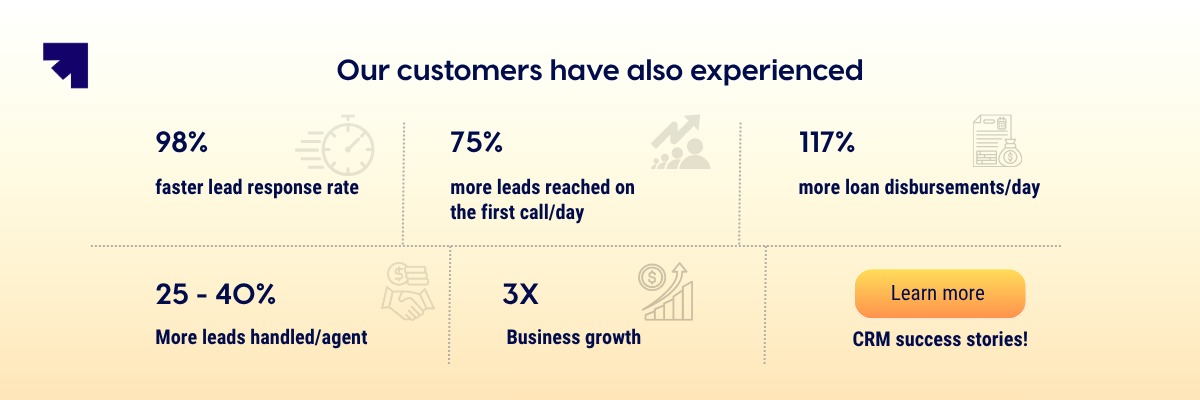
The Sales Box of Corefactors module gives sales teams AI-powered lead scoring, structured pipeline management, built-in telephony, IVR, call intelligence, and workflow automation in one place. Reps spend less time on administrative work and more time on conversations that close.
Beyond sales, Corefactors connects Marketing Box, Support Box, and Success Box, so the entire customer journey from first touch to renewal is visible in one system. There are no handoff gaps. No context lost between teams. No revenue leaking between departments.
Key capabilities that make a difference in daily execution include smart lead capture with instant allocation, omnichannel communication across calls, SMS, WhatsApp, and email, automated follow-ups and task reminders, 360-degree customer interaction history, and real-time dashboards that show pipeline health without any manual reporting effort.

Sales CRM: Related Reads
- What is Sales? The Ultimate Beginner-to-Pro Guide
- What Is Presales? Definition, Difference & Strategic Steps Behind High-Performing Sales Teams
- Sales Productivity: Benefits, Tools & Proven Tips to Improve Performance
- Sales vs. Marketing: What’s the Difference in 2026?
- What Is Sales Management? Meaning, Process, and Importance
- What Is a Sales Funnel? Your Ultimate Guide
- 5 Tips to Level Up Your Sales Process Automation
- What is a Sales Quota and Why Does it Matter?
- 15 Sales KPIs Every Sales Team Should Track in 2026
- What Is a Sales Strategy? Types, Examples & Best Strategies!
Heading 1
Heading 2
Heading 3
Heading 4
Heading 5
Heading 6
Lorem ipsum dolor sit amet, consectetur adipiscing elit, sed do eiusmod tempor incididunt ut labore et dolore magna aliqua. Ut enim ad minim veniam, quis nostrud exercitation ullamco laboris nisi ut aliquip ex ea commodo consequat. Duis aute irure dolor in reprehenderit in voluptate velit esse cillum dolore eu fugiat nulla pariatur.
Block quote
Ordered list
- Item 1
- Item 2
- Item 3
Unordered list
- Item A
- Item B
- Item C
Bold text
Emphasis
Superscript
Subscript
Frequently Asked Questions (FAQs)
What is a sales CRM?


A sales CRM is a software system that helps sales teams manage leads, track deal stages, log customer interactions, and automate follow-ups throughout the sales cycle. It provides visibility into every active opportunity and ensures nothing falls through the cracks between first contact and closed deal.
Which CRM is best for sales?
The best sales CRMs include Corefactors (all-in-one and affordable for growing businesses), Salesforce, HubSpot CRM, Zoho CRM, and Pipedrive. The right CRM depends on your team size, sales process, automation needs, and scalability requirements.
What are the key features of a sales CRM?
The most important features include contact and lead management, a visual sales pipeline, activity tracking, follow-up automation, lead scoring, omnichannel communication, sales forecasting, and reporting dashboards. These features work together to give teams clarity and consistency at every stage of the sales cycle.
How does a sales CRM improve conversion rates?
A sales CRM improves conversion by ensuring every lead is followed up on time, every deal has a clear next step, and every rep has full context before each conversation. It removes the manual gaps and delays that cause deals to go cold, which directly improves the percentage of leads that become customers.
Do small businesses need a sales CRM?
Yes. Once a business starts handling multiple leads from different channels, managing them manually through spreadsheets and emails becomes unreliable. A sales CRM provides structure from the start, prevents missed opportunities, and scales with the business without requiring proportional increases in team size.


%20(1).png)




.png)


.png)