

What is Cloud CRM? Benefits, Features, How to Choose One & More!

Heading 1
Heading 2
Heading 3
Heading 4
Heading 5
Heading 6
Lorem ipsum dolor sit amet, consectetur adipiscing elit, sed do eiusmod tempor incididunt ut labore et dolore magna aliqua. Ut enim ad minim veniam, quis nostrud exercitation ullamco laboris nisi ut aliquip ex ea commodo consequat. Duis aute irure dolor in reprehenderit in voluptate velit esse cillum dolore eu fugiat nulla pariatur.
Block quote
Ordered list
- Item 1
- Item 2
- Item 3
Unordered list
- Item A
- Item B
- Item C
Bold text
Emphasis
Superscript
Subscript

What is Cloud CRM? Benefits, Features, How to Choose One & More!
Karthik A
Join us on November 6th as Mr. Yash Mishra, Product Manager, Fatakpay, reveals the precise strategies that eliminates the speed trap and guarantees a 30% conversion boost.
Still managing leads in spreadsheets, chasing follow-ups across tools, or waiting days for clear pipeline visibility? These small delays quietly slow revenue, reduce team productivity, and make growth harder than it should be.
A cloud-based CRM changes this by bringing customer data, communication, automation, and reporting into one connected system that teams can access from anywhere. Instead of depending on manual updates or heavy IT support, businesses gain faster execution, clearer insight, and the flexibility to scale as operations evolve.
Research and Markets highlights that the cloud CRM market is expanding rapidly and is projected to reach USD 108.38 billion by 2032, growing at a 10.53% CAGR. In this blog, you will learn what a cloud CRM is, how it works in real workflows, the benefits and key features that drive measurable impact, and how to choose the right platform for long-term success.
What is a Cloud-based CRM?
A cloud CRM or a cloud-based CRM is a customer relationship management software hosted on remote servers and accessed through the internet instead of installed on local computers. It stores customer data, tracks interactions, and manages sales, marketing, and support workflows in one centralized online platform.
Cloud CRMs are delivered through a Software-as-a-Service (SaaS) model, where the vendor manages hosting, updates, security, and maintenance while customers access the system through a subscription.
In contrast, traditional on-premise CRMs are installed on local servers and require internal IT teams to manage infrastructure, upgrades, and data security. This often leads to higher setup effort and slower adaptability compared to cloud-based systems.
How Does a Cloud-Based CRM Work?
A cloud CRM works by storing customer data and business workflows on secure remote servers that users access through a web browser or mobile application. Instead of installing software locally, teams log in online to manage leads, track interactions, automate tasks, and view reports in real time across desktop and mobile environments.
At a functional level, the system operates through a few core layers:
1. Centralized Data Storage
All customer information, conversations, deal stages, and activity history are stored in a single cloud database. This ensures every team works from the same, up-to-date record rather than scattered spreadsheets or disconnected tools.
2. Workflow and Automation Engine
The CRM applies predefined rules to automate actions such as lead assignment, follow-up reminders, status updates, and notifications. This keeps processes consistent and reduces manual effort across sales, marketing, and support teams.
3. Integration with Business and Communication Tools
Cloud CRMs connect with email, telephony, messaging platforms, marketing systems, and analytics tools through APIs. These integrations allow data to move automatically between systems, creating a unified and continuous view of the customer journey.
4. Real-Time Access Across Web and Mobile CRM
Because the platform runs in the cloud, updates appear instantly for all users whether they are working from a desktop in the office or using a mobile CRM in the field. This enables on-the-go activity logging, quick follow-ups, and real-time visibility into pipeline and customer context from anywhere.
Read more: What is Mobile CRM, How to Use It & Why It Matters
5. Vendor-Managed Security and Infrastructure
The CRM provider manages hosting, backups, system updates, and security controls in the background. This keeps the platform reliable and compliant while freeing internal teams from maintaining servers or handling complex upgrades.
In simple terms, a cloud CRM functions as a shared, automated operating system for managing customer relationships and revenue execution from any location or device.
For organizations: It creates a single source of truth for revenue, improves forecast reliability, and enables leadership to scale processes without losing control or visibility.
For employees: It reduces repetitive work, surfaces next-best actions in real time, and enables productive selling or support from anywhere through mobile and automated workflows.
For IT teams: It shifts effort away from infrastructure maintenance toward governance, security, and integration strategy, while the vendor manages uptime, updates, and system resilience.
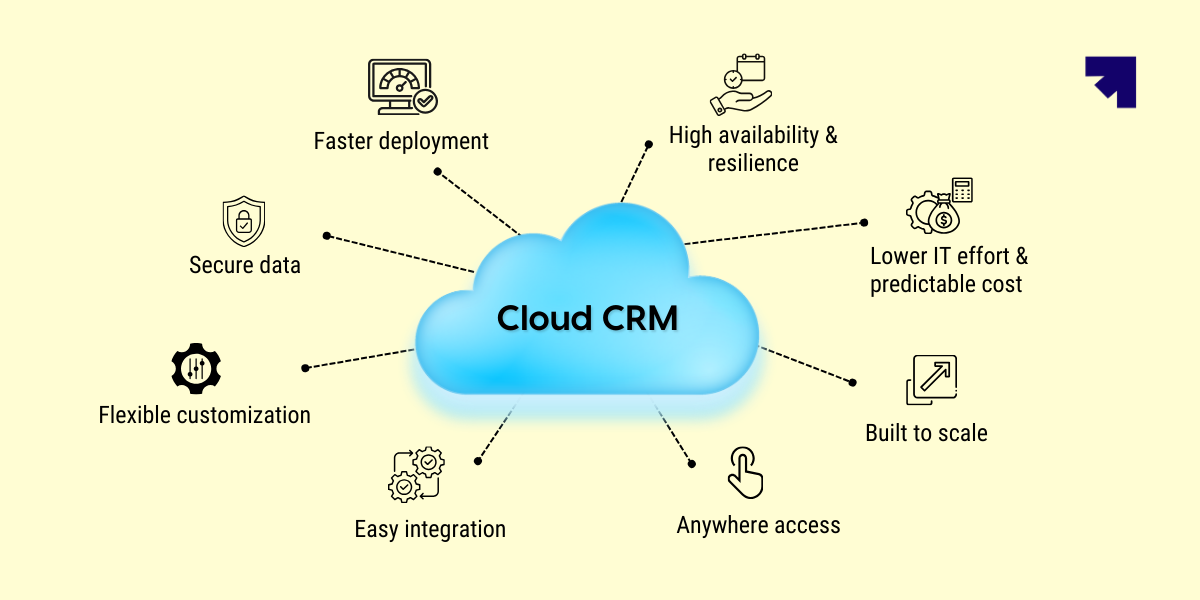
8 Benefits of a Cloud-Based CRM
A cloud-based CRM delivers more than convenient access to customer data. It changes how quickly teams execute, how clearly leaders see performance, and how easily the business adapts as channels, customers, and markets evolve.
Because the system runs online and updates continuously, improvements in process, automation, and insight compound over time rather than waiting for major upgrades.
At a practical level, the value appears across several core dimensions:
1. Faster deployment and continuous improvement
2. Anywhere access through web and mobile CRM
3. Built-in scalability for growth
4. Seamless integration with the SaaS ecosystem
5. Reduced IT overhead and operational burden
6. Stronger security, governance, and compliance
7. Predictable costs and flexible resource planning
8. High availability and data resilience
In short, the benefits of a cloud-based CRM extend beyond convenience. They reshape how organizations scale revenue, how employees execute daily work, and how IT maintains secure, resilient systems without slowing business momentum.
Learn more: 8 Benefits of a Cloud-Based CRM in 2026
10 Key Features of a Cloud-Based CRM
A cloud CRM is built to centralize customer data, automate revenue workflows, and deliver real-time visibility across teams. Rather than acting as a static contact database, it functions as an operational layer that connects sales, marketing, service, and leadership decision-making inside one continuously evolving platform.
Here are the ten key features of a cloud CRM:
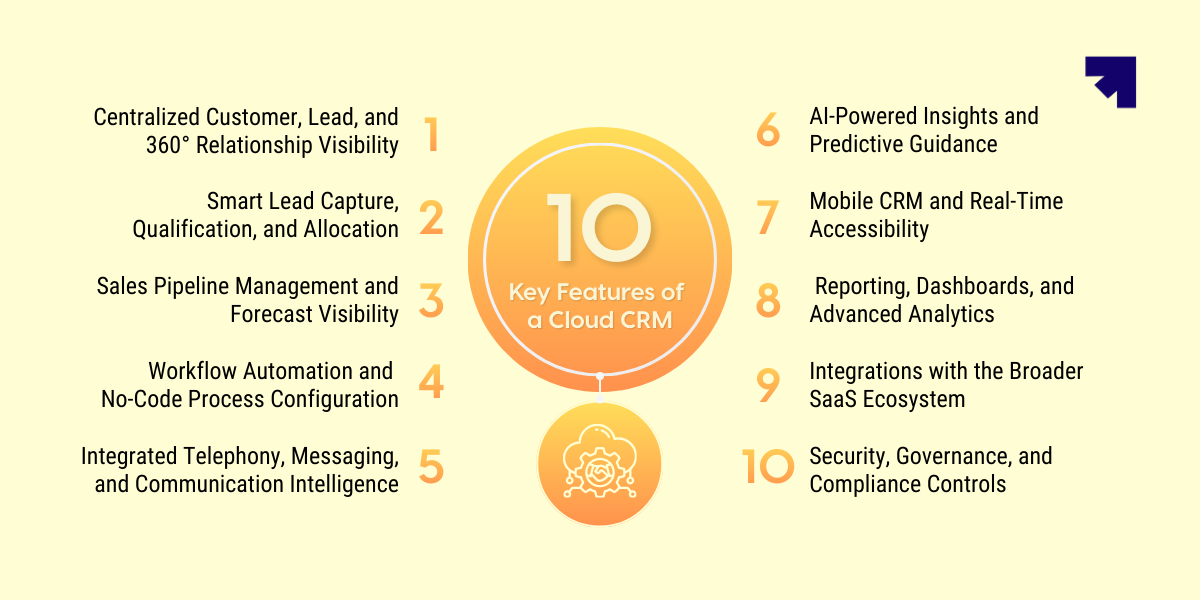
1. Centralized Customer, Lead, and 360° Relationship Visibility
Cloud CRMs unify contacts, accounts, conversations, deal stages, and activity history within a single shared system. This creates a 360° customer view, allowing every team to understand context, past interactions, and current opportunities without switching tools.
A unified record strengthens continuity across the lifecycle from first inquiry to renewal while reducing data loss during handoffs between marketing, sales, and post-sale teams.
2. Smart Lead Capture, Qualification, and Allocation
Modern cloud CRMs automatically capture leads from forms, campaigns, calls, and digital channels, ensuring no opportunity is missed. Intelligent routing rules then assign leads based on territory, capacity, priority, or predefined logic.
This structured allocation improves response speed, balances workload across teams, and increases the likelihood that high-intent prospects receive timely engagement.
3. Sales Pipeline Management and Forecast Visibility
Visual pipelines track deal movement across defined stages, helping teams prioritize actions and identify stalled opportunities early. Managers gain structured insight into conversion rates, deal velocity, and expected revenue.
This visibility supports more accurate forecasting and enables proactive intervention before performance gaps impact targets.
4. Workflow Automation and No-Code Process Configuration
Cloud CRMs automate repetitive actions such as follow-ups, reminders, approvals, and stage transitions. This ensures consistent execution while reducing manual workload for frontline teams.
Many platforms now provide no-code or low-code configuration, allowing business users to design workflows, rules, and data structures without engineering support. This accelerates process improvement and keeps the system aligned with changing operations.
5. Integrated Telephony, Messaging, and Communication Intelligence
Built-in telephony and messaging integrations centralize calls, texts, emails, and sometimes WhatsApp conversations within the CRM timeline. Performance insights such as call outcomes, response times, and engagement patterns become measurable.
This unified communication layer improves coaching, accountability, and customer experience by ensuring every interaction is visible and trackable.
6. AI-Powered Insights and Predictive Guidance
AI capabilities analyze historical activity, deal behavior, and engagement signals to surface risks, recommend next actions, and highlight high-probability opportunities. This shifts decision-making from intuition toward data-driven guidance.
Over time, AI improves prioritization, forecasting confidence, and overall productivity by helping teams focus effort where impact is highest.
7. Mobile CRM and Real-Time Accessibility
Mobile applications allow users to log activities, update deals, access customer context, and communicate while in the field or working remotely. Real-time synchronization ensures updates made on mobile instantly reflect across the system.
This keeps execution continuous regardless of location and prevents delays in follow-ups or reporting.
8. Reporting, Dashboards, and Advanced Analytics
Real-time dashboards and customizable reports provide visibility into pipeline health, activity levels, and revenue performance. Leaders can monitor trends, identify bottlenecks, and measure productivity without manual consolidation.
Advanced platforms extend this with predictive analytics and AI-driven forecasting for deeper strategic insight.
9. Integrations with the Broader SaaS Ecosystem
Cloud CRMs connect with marketing automation, support systems, billing tools, analytics platforms, and other SaaS applications through APIs and native connectors. This keeps customer data synchronized across the full lifecycle.
Integrated systems reduce duplication, improve accuracy, and enable coordinated engagement from first touch through retention.
10. Security, Governance, and Compliance Controls
Role-based permissions, audit trails, encryption, and compliance frameworks protect sensitive customer information while ensuring regulatory alignment. Governance becomes embedded in daily workflows rather than managed separately.
These controls grow in importance as organizations expand across regions, industries, and regulatory environments.
In essence, the key features of a cloud CRM create a connected, automated, and intelligence-driven foundation for managing customer relationships and revenue execution.
How to Choose the Best Cloud-Based CRM
Choosing a cloud-based CRM is not about comparing long feature lists. The real goal is to find a system that solves your current execution gaps, supports daily workflows, and scales with your business over time.
Focus on the few factors that truly determine long-term success.
1. Goals, Pain Points, and Must-Have Capabilities
Start by identifying where leads slow down, follow-ups fail, or visibility breaks for leadership. These gaps define what the CRM must fix.
From there, list the essential capabilities your teams rely on automation, integrated communication, mobile access, AI insights, and clear reporting. Missing fundamentals usually lead to workarounds and fragmented data later.
2. Customization, Integrations, and Usability
Your CRM should adapt to your workflows, connect smoothly with existing tools, and remain simple enough for daily use. No-code flexibility, strong integrations, and intuitive design are critical for long-term adoption across teams.
3. Automation, AI, and Process Control
Strong cloud CRMs do more than store data. They automate routine work, enforce workflow discipline, and use AI to highlight risks or next-best actions. These capabilities directly influence productivity, forecasting accuracy, and revenue consistency as teams scale.
4. Pricing, Scalability, and Long-Term Value
Look beyond subscription fees to include implementation, training, integrations, and administration effort. At the same time, ensure the platform can scale across users, regions, and automation complexity without requiring migration later.
5. Reviews, Case Studies, and Real-World Proof
Customer feedback reveals how the system performs after deployment, not just during demos.
Look for patterns in adoption, support responsiveness, and measurable outcomes to validate long-term reliability. The best cloud-based CRM is the one that fits your workflows, grows with your business, and strengthens execution across the entire revenue lifecycle.
Why Choose Corefactors as an Ideal Cloud-Based CRM Software?
After understanding the value of cloud-based CRMs, the real decision is choosing a platform that supports daily revenue workflows, team coordination, and long-term scalability. Corefactors is built as a RevOps CRM to manage the complete lead-to-revenue lifecycle within one connected system.
Corefactors key capabilities include:
- Automated lead capture and intelligent routing to prevent lead leakage and ensure faster response
- End-to-end lead-to-revenue workflow management connecting marketing, sales, and customer engagement
- Integrated telephony and multichannel outreach across calls, SMS, email, and messaging within the CRM
- AI-based lead scoring and next-best-action insights to help teams focus on high-intent opportunities
- Sales automation and activity triggers to improve follow-up consistency and rep productivity
- Real-time pipeline, performance, and revenue dashboards for accurate forecasting and visibility
- No-code workflow configuration to customize processes without heavy technical dependency
- Role-based access, permissions, and governance controls to maintain structure as teams scale
- Unified communication and interaction history providing a complete 360° customer view
- Integration-ready CRM foundation to reduce tool fragmentation and support scalable RevOps execution
Corefactors also prioritizes enterprise-grade security and compliance, with ISO/IEC 27001:2022 and SOC 2 Type II certifications, ensuring customer data is protected as operations grow.
By bringing automation, engagement, reporting, and governance into one platform, Corefactors supports a more measurable and execution-focused revenue process. For organizations evaluating cloud CRM solutions, the best indicator of long-term fit is how well real workflows perform inside a RevOps-driven system.
.png)
Takeaway
A cloud CRM runs online through a SaaS model, centralizing customer data, workflows, and communication while reducing infrastructure management and improving real-time access across teams.
Key benefits include faster deployment, remote accessibility, built-in scalability, seamless integrations, lower IT burden, stronger governance, predictable costs, and high system availability. Together, these create a more agile and resilient revenue operation.
Core features such as 360° customer visibility, smart lead capture and allocation, automation, AI-driven insights, integrated communication, mobile access, analytics, integrations, and compliance controls are essential for long-term CRM effectiveness.
Choosing the right cloud CRM comes down to alignment with your goals, adaptability to your workflows, and the ability to scale while delivering measurable clarity across the full lead-to-revenue lifecycle. Want to see how Corefactors Cloud CRM fits into your revenue workflow? Book a quick demo
Heading 1
Heading 2
Heading 3
Heading 4
Heading 5
Heading 6
Lorem ipsum dolor sit amet, consectetur adipiscing elit, sed do eiusmod tempor incididunt ut labore et dolore magna aliqua. Ut enim ad minim veniam, quis nostrud exercitation ullamco laboris nisi ut aliquip ex ea commodo consequat. Duis aute irure dolor in reprehenderit in voluptate velit esse cillum dolore eu fugiat nulla pariatur.
Block quote
Ordered list
- Item 1
- Item 2
- Item 3
Unordered list
- Item A
- Item B
- Item C
Bold text
Emphasis
Superscript
Subscript
Frequently Asked Questions (FAQs)
1. What is a cloud-based CRM?


A cloud-based CRM is a customer relationship management system that runs online. You can use it through a web browser or mobile app without installing software on your own servers. It helps businesses manage leads, customers, sales and support activities in one place.
2. How is a cloud CRM different from traditional CRM software?
A cloud CRM is hosted by the provider and accessed online. Traditional CRM (on-premise) is installed on your company’s local servers and managed internally. Cloud CRM usually requires less IT support and is easier to maintain.
3. Cloud CRM vs On-Premise CRM: Which is better?
Cloud CRM is hosted online for easy access and quick setup, while on-premise CRM is installed on local servers and needs more internal maintenance. Cloud systems reduce IT workload and scale faster, whereas on-premise offers more infrastructure control but requires higher effort to manage.
4. How secure is a cloud CRM for sensitive customer data?
Most cloud CRMs offer strong security like encryption, access control, backups, and compliance support. Security depends on choosing a trusted provider and setting proper user permissions. Many providers also monitor systems 24/7 to prevent threats and data loss.
5. How can a cloud CRM help my sales and service teams work more efficiently?
Cloud CRM helps teams track leads, manage follow-ups, automate tasks, and access customer details quickly. It improves collaboration across sales and support teams with shared information. This reduces missed opportunities and helps teams respond faster.






.png)


.png)